Playwright MCP vs Playwright CLI: Which Should Your Team Actually Use in 2026?
Summarize With:


Playwright MCP and the Playwright CLI are not competitors, they solve different problems. The Playwright CLI (npx playwright test) runs your version-controlled test suite deterministically in CI; it's your production execution engine.
The Playwright MCP server (@playwright/mcp) exposes browser automation to AI agents like Claude and GitHub Copilot via the accessibility tree, for exploration, test authoring, and one-off automation in natural language.
Use the CLI for everything that must be repeatable and gated in CI. Use MCP for AI-assisted authoring and exploration, then export what it produces into CLI-run tests. Mature teams run both: MCP to write tests faster, the CLI to run them reliably.
The framing "MCP vs CLI" is the wrong question most teams arrive with. You don't choose one. You choose which job goes to which, and the cost of getting that boundary wrong, running AI-driven automation where you need determinism, or hand-writing what an agent could draft is real. This guide draws the boundary, with the security and CI implications that decide it.
One naming note before we start, because it trips up half the teams we talk to: in 2026, "Playwright CLI" can refer to two different tools. We untangle that below.
Figuring Out Where MCP Fits in Your Pipeline? Talk to a Playwright Engineer.
The 30-Second Distinction
| Playwright CLI | Playwright MCP Server | |
|---|---|---|
| What it is | The command-line test runner (npx playwright test) | A Model Context Protocol server (@playwright/mcp) exposing browser control to AI agents |
| Who/what drives it | Your code + CI pipeline | An AI assistant (Claude, GitHub Copilot, Cursor) via natural language. |
| What it operates on | Your written .spec.ts test files | The live page's accessibility tree, in real time. |
| Determinism | Fully deterministic, version-controlled. | Probabilistic-AI interprets each step |
| Primary job | Run the regression suite reliably, gate releases | Author tests, explore apps, do one-off automation. |
| Belongs in | CI/CD, every commit, release gates. | A developer's IDE, exploration, test drafting. |
| Maintained by | Microsoft (core framework). | Microsoft (@playwright/mcp). |
The one-line answer: the CLI runs tests; MCP helps write and explore them. They sit at different points in the lifecycle.
One Word, Two Tools: npx playwright test vs @playwright/cli
Before going further, a distinction that most comparison articles miss, and that changes the answer for teams using coding agents.
In early 2026, Microsoft released @playwright/cli (invoked as playwright-cli), a standalone command-line tool built specifically for AI coding agents. It is not the same thing as npx playwright test. So "Playwright CLI" now means two different tools:
| Tool | What it is | Who uses it |
|---|---|---|
| npx playwright test | The test runner executes your .spec.ts suite. | Your CI pipeline and your engineers. |
| @playwright/mcp | MCP server streams page state into an AI agent's context window. | AI agents in MCP-native environments (Cursor, Claude Desktop, VS Code). |
| @playwright/cli | Agent-focused CLI saves browser state to disk as compact snapshot files. | Terminal-native coding agents (Claude Code, Copilot CLI). |
The difference between @playwright/mcp and @playwright/cli is architectural, and it matters at scale. MCP streams the full accessibility tree into the AI model's context window on every interaction; every button, label, and form field, at every step. Microsoft's own benchmarks put a typical browser automation session at roughly 114,000 tokens through MCP. On long flows, the model's context fills with stale page state, and by step 12 of a 20-step task the agent starts losing its place, misreading where it is, reusing selectors from pages it left three steps ago.
@playwright/cli keeps browser state off the context window entirely. It saves page snapshots to disk as compact YAML files; the agent gets short element references (e21, e15) and issues small shell commands against them playwright-cli click e21, playwright-cli fill e15 "user@example.com". Same task, roughly 27,000 tokens about a 4x reduction, with no context exhaustion on long sessions.
Why the gap widens on real workloads
The 4x figure actually understates what happens on longer sessions, because two costs compound.
The first is schema overhead. When an MCP server connects, it loads the full definition of every tool it exposes parameters, types, usage descriptions into the model's context before the agent takes a single action. For the Playwright MCP server's roughly 26 tools, that's on the order of 3,600 tokens of upfront cost per session. The CLI has no schema to load; the agent learns its commands from a skill description of roughly 68 tokens and invokes them as shell strings.
The second is accumulation. Every MCP interaction returns page state inline, and that state stays in the conversation after the agent moves on. Navigate five pages and you're carrying four pages' worth of stale accessibility trees alongside the current one. On simple pages that's about a thousand tokens per snapshot; on dense enterprise dashboards, single snapshots can run into tens of thousands. By step 10 of a workflow, an MCP session is typically carrying 7,000+ tokens of page state it no longer needs, while the equivalent CLI session has consumed a couple hundred tokens of command output, because snapshots live in files the agent reads only when it chooses to.
This is why community benchmarks describe MCP sessions becoming unreliable after roughly 15-20 browser interactions, while disk-based CLI sessions hold steady across 30-50 steps, the range a real end-to-end user flow actually requires. In independent head-to-head testing, the CLI approach also completed the benchmark task with a perfect success rate while the MCP run hit partial failures, consistent with what context pressure does to agent reliability.
Two more practical differences worth knowing. The CLI exposes a broader command surface (50+ commands versus roughly 26 MCP tools, including granular mouse, storage, and tracing controls) precisely because shell commands carry no schema cost. And the CLI records sessions and can generate a complete Playwright test file from what the agent just did selectors and all which MCP cannot do natively; with MCP, the agent writes the test manually from whatever is still in its context.
At team scale, this arithmetic is a budget line, not a curiosity. A QA org running hundreds of agentic sessions a month at a 4-10x token difference is the difference between an AI tooling bill your finance team ignores and one they schedule a meeting about.
Everywhere else in this article, "CLI" means the test runner (npx playwright test). When we mean the agent tool, we'll say @playwright/cli explicitly.
What is the Playwright CLI?
The Playwright CLI is the test runner you already know, the thing npx playwright test invokes. It's been the backbone of Playwright since launch, and in 2026 it's still where production testing lives.
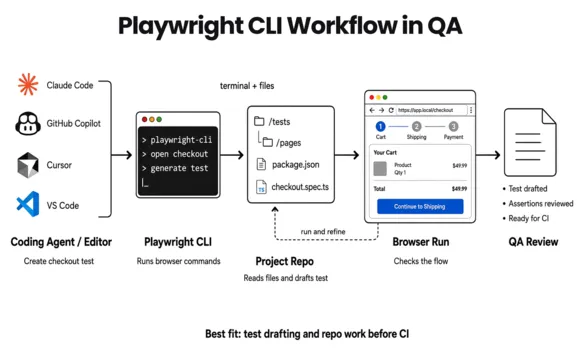
It does what production QA requires:
Runs your committed
.spec.tsfiles exactly as written, every timeExecutes in parallel across workers and browser contexts natively
Integrates with GitHub Actions, GitLab CI, Jenkins, Azure DevOps
Produces deterministic pass/fail results you can gate a release on
Captures traces, screenshots, and video for failures
Its defining property is determinism. The same test, against the same build, produces the same result. That's non-negotiable for a CI gate; a release decision can't depend on an AI's interpretation of what a button means today versus yesterday.
The CLI is not going anywhere. Anything that must be repeatable, auditable, and version-controlled runs here.
What is the Playwright MCP server?
The Playwright MCP (Model Context Protocol) server is newer and frequently misunderstood. It exposes Playwright's browser automation as structured tools that an AI model can invoke. Instead of you writing page.click(), an AI agent (Claude, GitHub Copilot, Cursor) interprets a natural-language instruction ("log in and go to billing") and executes it through Playwright.
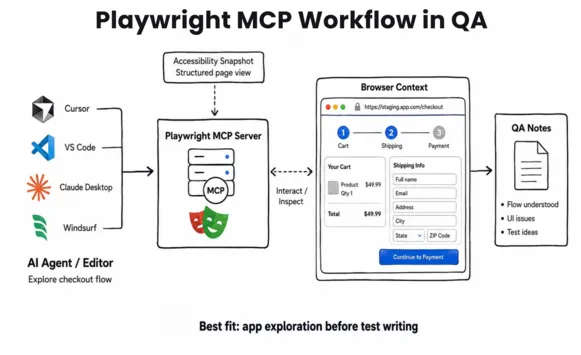
The critical technical detail: MCP operates on the page's accessibility tree, not on screenshots. It reads the structured hierarchy of roles and labels (button "Submit", textbox "Email") the same way a screen reader does. That makes its actions faster and more deterministic than vision-based AI automation, but it's still the AI deciding what to do, step by step.
What MCP is genuinely good at:
Test authoring acceleration: An agent explores your app and drafts Playwright test code you refine.
Exploratory QA: "Check whether the checkout flow handles an expired card" without writing a script first.
One-off automation: Data extraction, repetitive manual QA, smoke-checking an unfamiliar build.
Codebase exploration: Understanding test coverage on an app you didn't build.
What MCP is not: a replacement for your CI suite. AI-driven, step-by-step interpretation is the opposite of what a deterministic release gate needs.
The Core Principle: Author with MCP, Run with the CLI
Here's the boundary that resolves the "vs" question:
MCP is an authoring and exploration accelerant. The CLI is the execution engine. The output of MCP-assisted work should land as version-controlled test files that the CLI then runs - reviewed by a human first, because AI-generated selectors and assertions are first drafts, not final tests.
Teams that get this wrong in one of two directions:
Over-using MCP: trying to run AI-driven automation as the actual test suite. Result: non-deterministic CI, flaky release gates, no audit trail.
Ignoring MCP: hand-writing every test from scratch when an agent could draft 70% of it. Result: slower authoring, no leverage from the AI tools the team already pays for.
Playwright MCP vs CLI for AI Agents
Playwright MCP and Playwright CLI both help AI agents work with browsers, but they work in different ways. MCP is better when the agent needs to explore a website, while CLI is better when the agent is working inside your codebase.
| Simple question | Playwright MCP | Playwright CLI |
| How does the agent use it? | The agent uses MCP tools inside the AI app | The agent runs commands in the terminal |
| Best for which agent? | Agents that support MCP, like Cursor, VS Code, Claude Desktop, and Windsurf | Coding agents that can use the terminal, like Claude Code and GitHub Copilot |
| What does the agent do? | Opens the website, clicks things, and reads the page | Works inside the codebase and runs browser commands |
| How does it read the page? | Reads the page through accessibility snapshots | Reads command output and saved browser data |
| How much context does it use? | Usually more context | Usually less context |
| Good for long work? | Good for short exploration, but can become heavy | Better for longer coding work |
| Good for writing tests? | Good for understanding the user flow first | Better for drafting and improving test code |
| What access is needed? | MCP setup and browser access | Terminal and project file access |
| Main benefit | Easy browser control inside the AI app | Faster for coding agents working in a repo |
| Main limit | Can become heavy with too much page data | Needs terminal access |
Which Tool Pairs With Your Coding Agent?
The MCP vs @playwright/cli decision stops being abstract once you name the agent your team actually uses. Each major coding agent has a natural integration pattern, and getting it wrong means slower sessions, higher token costs, or a configuration that fights the agent's workflow.
Claude Code use @playwright/cli
Claude Code is terminal-native: it reads files, runs shell commands, and works through your filesystem the way a developer does. @playwright/cli fits that model exactly, the agent issues short commands, reads snapshot files from disk, and keeps its context window free for your actual test code.
npm install -g @playwright/cli@latestplaywright-cli install
No further configuration, Claude Code invokes it directly through its Bash tool. If you also want MCP available for interactive exploration:
claude mcp add playwright npx @playwright/mcp@latest
Use MCP in Claude Code for short exploratory sessions; use @playwright/cli for structured test generation, suite porting, and anything beyond 10-15 steps.
GitHub Copilot (VS Code) - MCP, pre-configured
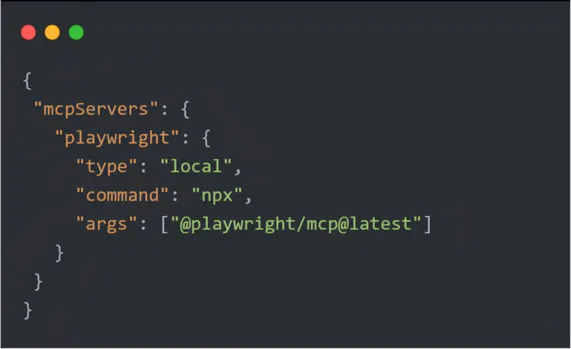
Copilot's Coding Agent is the one place where Playwright MCP requires zero setup, it's configured automatically and can read, interact with, and screenshot pages on localhost during code generation. For Copilot Chat, add it explicitly:
Cursor - MCP for short sessions, @playwright/cli for batch work
Cursor supports both. For interactive, in-editor authoring, one test, one live page, MCP is the faster setup: Cursor Settings → MCP → Add new MCP Server, command npx @playwright/mcp@latest. For longer sessions generating tests across multiple pages, porting a suite, switch to @playwright/cli through Cursor's terminal. Context exhaustion in extended MCP sessions is a real problem in agent mode; the disk-based CLI avoids it.
Windsurf, Goose, Claude Desktop, and other MCP-native environments - MCP
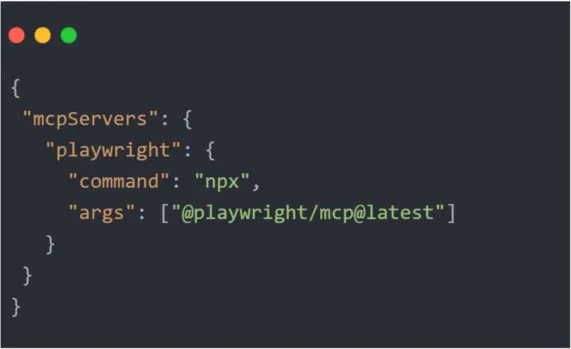
These environments are built around the MCP protocol and persistent browser sessions, exactly where MCP outperforms. The standard config works across all of them:
The one-line rule
If your agent has filesystem and shell access, use @playwright/cli. If it runs in a sandboxed or MCP-native environment, use MCP. When in doubt: if your agent can run ls, the CLI will serve it better for anything past a quick smoke check.
| Coding Agent | Recommended | Setup effort | Best for |
|---|---|---|---|
| Claude Code | @playwright/cli | One npm install | Structured generation, suite porting, long sessions. |
| GitHub Copilot (VS Code) | MCP pre-configured | Zero | In-editor authoring, quick exploration. |
| Cursor | MCP (short) / @playwright/cli (batch) | One config entry | Both switch by session length. |
| Windsurf / Goose / Claude Desktop | MCP | One config file | Persistent sessions, agentic loops. |
Where MCP Genuinely Beats the CLI
Most 2026 comparisons read like CLI advocacy. That's not quite fair, and if you standardize on CLI everywhere you'll hit real friction in specific situations. Here's the honest other side.
- Sandboxed environments: MCP is the only option. If your agent runs in Claude Desktop, a browser-based assistant, or any environment without shell and filesystem access, the CLI literally cannot function: it needs a disk to write snapshots to. No filesystem, no CLI. This isn't an edge case, it covers every non-developer teammate using a desktop AI assistant.
- Fresh state without asking. MCP returns an updated snapshot after every action. The CLI requires the agent to re-run
snapshotto refresh element references, and when a page re-renders, old references silently go stale. A well-prompted agent handles this; a lazily prompted one clicks a reference that no longer points where it thinks. MCP's chattiness is expensive, but it's also why the agent's picture of the page is never out of date. - Rich reasoning on short sessions. For tasks under roughly 10 steps where the agent needs to deeply understand a page; building a test charter, mapping every interactive element, deciding what's worth testing, having the full accessibility tree inline is genuinely valuable. The context cost buys reasoning quality. Below that threshold, the token argument for CLI mostly disappears.
- Self-healing loops. Workflows where the agent watches for a broken selector and reasons about an alternative benefit from MCP's continuous state visibility. Structured snapshot diffs across steps are exactly what that kind of loop needs, and the CLI's read-on-demand model makes it clumsier.
- Built-in waiting. MCP ships
browser_wait_for; with the CLI the agent polls with repeated snapshots until an element appears. Both work; MCP's is cleaner. - Attach to a running browser. Since Playwright 1.59,
browser.bind()lets the MCP server connect to an already-open browser, the "I'll debug manually, then hand this session to the agent" workflow. The CLI has no equivalent. - Zero-config portability. MCP is one JSON block in a config file, identical across Cursor, VS Code, Windsurf, Claude Desktop, and every other MCP host. The CLI needs an npm install and skill setup per machine. For a quick experiment, MCP wins on friction.
The honest summary: CLI wins on economics and endurance; MCP wins on freshness, reasoning depth per step, and reach into environments the CLI can't touch. If someone tells you one is simply better, they're describing their workflow, not yours.
What Microsoft's Recommendation Actually Means
Microsoft's own Playwright MCP README now points coding-agent users toward CLI + Skills, and the official docs describe the CLI as best for coding agents and MCP as best for specialized agentic loops that need persistent state. Predictably, this got read as "MCP is dead."
It isn't, and the recommendation is narrower than the headlines. Three things are true at once:
- It's a scoping statement, not a deprecation. Microsoft maintains both packages on the same Playwright core. The guidance says: if your agent is a high-throughput coding agent juggling a codebase, tests, and browser work inside one context window, the CLI's economics fit better. That's most Claude Code and Copilot usage, hence the default.
- MCP keeps the jobs it was built for. Persistent-state loops, exploratory automation, self-healing workflows, and every sandboxed client remain MCP territory, per the same guidance.
- "Should we migrate our MCP setup?" has a one-line answer. If your sessions are short and exploratory, no, you'd gain little. If your agents run long generation or porting sessions and you're watching token spend, yes, and the switch is an afternoon, because both tools drive the same engine and your test output format doesn't change.
The recommendation validates the boundary this guide draws rather than replacing it: match the tool to the session, not to the hype cycle.
Decision Matrix: Which Tool for Which Job
| Scenario | Use | Why |
|---|---|---|
| Regression suite running on every commit | CLI | Must be deterministic and version-controlled. |
| Release gate / merge gate in CI | CLI | A release decision can't depend on AI interpretation. |
| Drafting tests for a new feature | MCP → CLI | Agent drafts, human reviews, CLI runs. |
| Exploratory QA on an unfamiliar build. | MCP | Natural-language exploration, no script needed. |
| One-off data extraction / manual-QA automation | MCP | Fast, disposable, no maintenance expected. |
| Porting Selenium tests during migration | MCP → CLI | Agent accelerates the port; CLI runs the result. |
| Auditable, compliance-gated test evidence | CLI | Reproducible runs with traces; AI steps aren't auditable. |
| Scaling parallel execution across browsers | CLI | Native worker/context parallelism. |
| Smoke-checking a staging deploy quickly | MCP | Faster than writing a throwaway spec. |
The pattern: anything repeatable, gated, or audited → CLI. Anything exploratory, draft-stage, or one-off → MCP. Anything long-running and agent-driven → @playwright/cli
Want a Playbook for Introducing MCP Without Breaking Your CI? Book a Call.
Is This Worth Learning as a Tester?
A question we hear from individual QA engineers, as distinct from the teams and leaders this guide mostly addresses, deserves its own answer: is any of this worth my time, or is it hype that creates more review work than it saves?
The honest answer: yes, it's worth learning with a specific caveat about what "learning it" means.
- What it actually changes about the job. These tools don't test for you; they compress the mechanical parts of test authoring. The agent drafts the navigation, the selectors, the boilerplate. What it can't do is decide what's worth testing, judge whether a generated assertion actually validates the requirement, or recognize that a passing test is passing for the wrong reason. That judgment layer is the job, and it's untouched. What shrinks is the time between "I know what to test" and "the test exists."
- The review-burden concern is real but front-loaded. Early on, you'll spend meaningful time correcting AI-drafted selectors and tightening loose assertions, and it can feel like the tool created work. That cost drops sharply once you feed the agent your conventions (selector strategy, naming, structure) instead of prompting from zero each time. Teams that write those conventions down once see draft quality jump; teams that don't conclude the tools are overrated. The tools reward exactly the discipline good QA engineers already have.
- Does it threaten the role? It changes the ratio of the role. Less time hand-writing
page.getByRole(...)chains; more time on test design, coverage judgment, and reviewing machine output. In our client work, the engineers who adopted these tools became the reference points on their teams, the people others route AI-workflow questions through. That's leverage, not displacement.
A concrete first week:
- Install the CLI (
npm install -g @playwright/cli@latest) and drive it manually first;goto,snapshot,click e21, until element references feel natural. Twenty minutes, no agent involved. - Point a coding agent at a demo app (TodoMVC works) with a small task: "test the add-item flow using playwright-cli." Read what it produces before you judge it.
- Give it one real, low-stakes flow from your own product. Review the draft ruthlessly: selector quality, assertion meaning, isolation.
- Write down every correction you made. That list is the seed of your team's generation guidelines, and the difference between this tooling compounding or stalling.
If after a week the drafts still cost more than they save, your app may be a poor fit (canvas-heavy UIs, missing accessibility semantics), that's a real category, and it's better to learn it in week one than after an org-wide rollout.
The Security Implication Most Teams Miss
This is where the decision stops being about convenience and becomes a governance question, and it's the part generic comparisons skip.
The Playwright MCP server gives an AI agent the ability to control a real browser session. Depending on configuration, that can include authenticated sessions, access to internal environments, and the ability to submit forms or trigger actions. That's powerful for authoring, and a real attack surface if ungoverned.
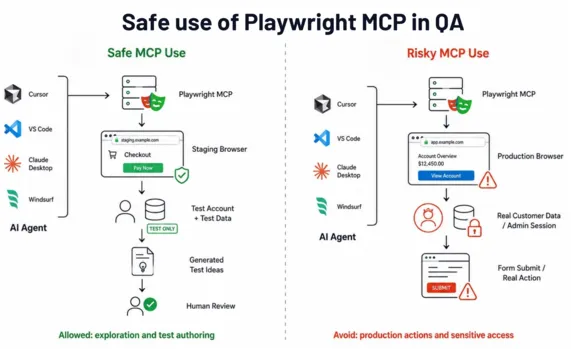
For enterprise QA teams, the security posture differs sharply:
CLI: Runs your reviewed, version-controlled code. The attack surface is your own test code and dependencies, the same supply-chain considerations as any npm project. Mature, well-understood.
MCP: Runs AI-interpreted instructions against a live browser. Risks include prompt injection (a malicious page instructing the agent), over-broad session access, and the agent taking unintended actions in a real environment.
Governance rules we apply before MCP touches anything sensitive:
MCP runs against non-production / test environments only, never authenticated production sessions.
Generated tests are human-reviewed before they enter the CLI suite.
MCP is a developer-machine / authoring tool, not a CI runtime.
Credentials available to an MCP session are scoped to test data, never real customer or admin access.
If your industry carries compliance weight (FinTech, Healthcare), this boundary isn't optional - the deterministic, auditable CLI is what produces the evidence an auditor accepts; MCP-driven actions don't.
CI/CD: Why MCP Doesn't Belong in Your Pipeline (Yet)
A natural question: "Can we just run MCP in CI and let the AI test everything?"
No, and not because the tooling can't, but because it defeats the purpose of a pipeline. CI exists to produce a reliable, repeatable signal that gates releases. MCP's value is interpretation and flexibility - the opposite of repeatability. Run AI-interpreted automation as your gate and you get a release decision that can vary run-to-run for reasons no one can fully trace.
The correct CI architecture in 2026:
CLI runs the suite deterministic, parallel, trace-on-failure, gating merges and releases
MCP lives upstream on developer machines and in the authoring workflow, generating the tests the CLI will run
AI-generated tests enter CI only after human review treated as first drafts, validated, then committed
This keeps the leverage of AI authoring without surrendering the determinism a release gate depends on.
What Should a QA Org Standardize On?
For a QA leader, the individual-engineer question becomes an org question: what do we adopt, and in what order?
Standardize in lanes, not on a single tool:
- The CLI test runner (
npx playwright test) is the non-negotiable foundation, the deterministic suite in CI. Everything else is upstream of it. @playwright/clibecomes the default agent lane for engineers doing structured generation in Claude Code, Copilot, or Cursor, it's the cheaper, more durable option for daily SDET work.- MCP stays available for the exploration lane; sandboxed clients, short deep-reasoning sessions, and any self-healing experiments.
Playwright Test Agents (Planner, Generator, Healer, bundled since v1.56). They're a coordinated authoring pipeline, not a browser integration layer, and they're promising with a known sharp edge: the Healer's automatic selector fixes succeed roughly three-quarters of the time by Microsoft's own numbers, and among the failures are quiet false positives, a fixed test now targeting a similar-looking but functionally wrong element. Our position: adopt Test Agents only behind the same human-review gate as everything else AI-generated, and never let the Healer commit fixes unreviewed. A test that heals itself into testing the wrong thing is worse than a test that fails honestly.
Sequence for a team starting from zero: deterministic CLI suite first, @playwright/cli authoring second, MCP exploration third, Test Agents last, each behind the review gate before the next is introduced.
How ThinkSys Introduces MCP Into a Playwright Practice
CLI suite first, always. We establish a deterministic, well-architected CLI-run suite; selector strategy, test-data isolation, CI integration before introducing any AI authoring. AI accelerates whatever architecture exists; we make sure it's sound first.
MCP as an authoring accelerant, scoped to test environments. We bring MCP into the authoring workflow with generation guidelines: what patterns to follow, what requires human review, what the agent must never touch.
Human review gate. Every MCP-drafted test is reviewed for selector quality and assertion correctness before it joins the CLI suite. AI output is a first draft.
Governance for regulated teams. For FinTech and Healthcare clients, we define the MCP security boundary non-prod only, scoped credentials, no production sessions, as part of the engagement.
The result: Teams write tests faster with MCP and run them reliably with the CLI, without trading determinism for speed.
How ThinkSys Uses Playwright in Real Client Work
In one project for Boostlingo, the automation setup was moved from WebdriverIO to Playwright with TypeScript. The team also used GitHub Copilot and Cursor during test development and added CI/CD sharding. This reduced the QA cycle from 5–7 days to about 2 hours.
For Centerbase, a custom Playwright automation framework helped bring regression testing down from 3–4 weeks to 2 weeks.
For FreshTracks Canada, Playwright was used to automate high-priority regression tests from a large manual test suite.
That hands-on work is why this comparison treats MCP and CLI as support tools, not replacements for a proper automation setup. They can help AI agents explore flows and draft tests faster. But production testing still needs clean code, human review, CI/CD, and clear ownership of the framework.
Conclusion
Playwright MCP vs CLI is a false choice. The CLI is your deterministic execution engine, it runs the suite, gates releases, and produces auditable evidence. MCP is your AI-powered authoring and exploration accelerant, it drafts tests and explores apps in natural language. And for terminal-native coding agents, @playwright/cli is the token-efficient third piece that keeps long agentic sessions reliable. The teams getting the most from Playwright in 2026 use MCP or @playwright/cli to write tests faster and the CLI to run them reliably, with a human review gate and a clear security boundary between them.
Get that boundary right and AI tooling compounds your team's output. Get it wrong, AI in the CI gate, or no AI at all, and you either lose determinism or leave leverage on the table.
Building an AI-Assisted Playwright Workflow the Right Way? Talk to ThinkSys.