What Is Playwright MCP? The Complete Guide for QA & Engineering Teams (2026)
Summarize With:


Playwright MCP is an official Microsoft server (@playwright/mcp) that implements the Model Context Protocol, exposing Playwright's browser automation as structured tools an AI agent can call. It lets AI assistants like Claude, GitHub Copilot, and Cursor control a real browser through natural language i.e. navigating, clicking, filling forms, and extracting data by operating on the page's accessibility tree rather than screenshots. Unlike vision-based AI automation, this makes its actions faster, lighter, and more deterministic. Playwright MCP is used for AI-assisted test authoring, exploratory QA, and browser automation, and is maintained by the same Microsoft team that builds Playwright itself.
Exploring Playwright MCP for Your Team? Talk to a Playwright Engineer.
Why Playwright MCP Exists
To understand Playwright MCP, you have to understand the problem the Model Context Protocol (MCP) solves. MCP, introduced by Anthropic in late 2024 and now an open standard adopted across the AI ecosystem, is a universal way for AI models to connect to external tools and data. Before MCP, every AI-to-tool integration was bespoke. MCP standardized it, one protocol, any compliant tool, any compliant model.
Playwright MCP is Microsoft's MCP server for browser automation. It takes Playwright already the leading browser automation framework, and exposes its capabilities as MCP "tools" that any MCP-compatible AI client can invoke.
The problem it solves is specific: AI agents were bad at using browsers. Early attempts had models look at screenshots and guess where to click - slow, expensive, and error-prone. Playwright MCP changed the approach. Instead of pixels, the AI works from the page's structured accessibility tree. The result is browser automation that an AI can perform reliably enough to be useful for real QA work, not just demos.
In short: Playwright MCP is what makes "tell an AI to test your app" actually work.
How Playwright MCP Actually Works (the Accessibility Tree)
When you interact with a web page, the browser maintains an accessibility tree, a structured, hierarchical representation of the page built for assistive technologies like screen readers. Every meaningful element has a role (button, link, textbox, heading) and an accessible name (its visible label or ARIA label).
Playwright MCP exposes that tree to the AI, not a screenshot. So when an agent receives "click the Submit button," it doesn't scan an image looking for something that looks like a button. It queries the accessibility tree for an element with role: button and name: "Submit" and acts on it directly.
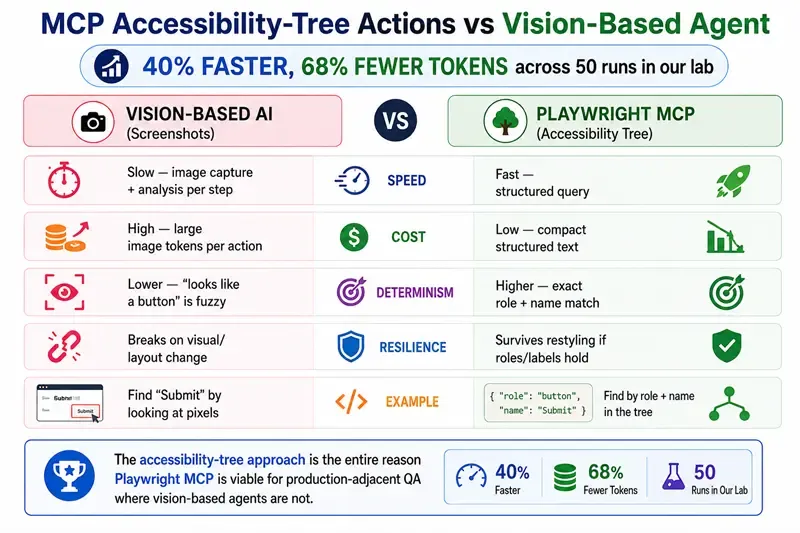
Why this matters, three concrete advantages over vision-based AI automation:
| Property | Vision-based AI (screenshots) | Playwright MCP (accessibility tree) |
|---|---|---|
| Speed | Slow - image capture + analysis per step | Fast: structured query |
| Cost | High - large image tokens per action | Low: compact structured text |
| Determinism | Lower: "looks like a button" is fuzzy | Higher: exact role + name match |
| Resilience | Breaks on visual/layout change | Survives restyling if roles/labels hold |
Note: The accessibility-tree approach is the entire reason Playwright MCP is viable for production-adjacent QA work where vision-based agents are not.
Playwright MCP Architecture
The architecture has three layers, and understanding them clarifies both setup and security:
Layer 1: The AI client. Claude, GitHub Copilot, Cursor, or any MCP-compatible assistant. This is where you type the natural-language goal ("log in and check the billing page"). The client decides what to do, step by step, but it has no browser access of its own.
Layer 2: The MCP server (@playwright/mcp). The translator in the middle. It receives the client's tool calls ("click the element with role button and name Submit"), executes them through Playwright's automation engine, and returns structured results, the updated accessibility tree, extracted data, or a screenshot.
Layer 3: The browser. A real Chromium, Firefox, or WebKit instance that the MCP server launches and controls. This is where actions actually happen: pages load, forms submit, sessions exist.
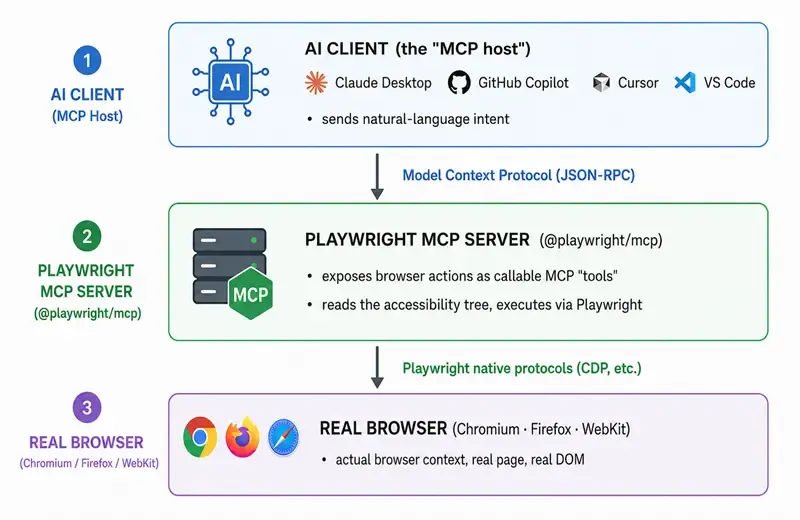
The AI client never touches the browser directly. It sends intent to the MCP server; the server translates that into Playwright actions against a real browser context and returns structured results. This separation is exactly why the security boundary is so important, the MCP server holds the keys to a real browser.
How to Set Up Playwright MCP
Setup is genuinely simple. Three steps.
Step 1: Install the server:
The npx-based config in Step 2 fetches the latest server automatically, so a local install is optional, useful mainly for pinning a version in a project.
npm install -D @playwright/mcp@latest
Step 2: Register it with your AI client:
Configuration varies by client. For a Claude Desktop / VS Code-style MCP config:
{
 "mcpServers": {
   "playwright": {
     "command": "npx",
     "args": ["@playwright/mcp@latest"]
   }
 }
}
For headed mode (visible browser during interactions, useful while authoring):
{
 "mcpServers": {
   "playwright": {
     "command": "npx",
     "args": ["@playwright/mcp@latest", "--headed"]
   }
 }
}
Using Claude Code? One command, no config file: claude mcp add playwright npx @playwright/mcp@latest , then verify with /mcp
Step 3: Use it:
Restart your AI client. It now has Playwright tools available. Prompt it in natural language: "Open our staging site, log in with the test account, go to the billing page, and tell me what fields the form has." The agent plans the steps, calls the MCP tools, and reports back, or generates the Playwright test code for you to review.
Common useful flags: --browser firefox|webkit|chromium, --headed, --device "iPhone 15" for mobile emulation, and isolation/profile flags for session control.
The Playwright MCP Tools Reference
Playwright MCP exposes browser capabilities as discrete tools the AI can call. Knowing them clarifies what an agent can actually do:
| Tool category | What the AI can do | Typical use |
|---|---|---|
| Navigation | Open URLs, go back/forward, reload | Move through a flow |
| Snapshot | Capture the accessibility tree of the current page | Understand page state before acting |
| Click / Hover | Interact with elements by role + name | Drive the UI |
| Type / Fill | Enter text into fields | Form submission, search |
| Select / Check | Dropdowns, checkboxes, radios | Configuration flows |
| Wait | Wait for elements / load states | Handle dynamic content |
| Screenshot | Capture a visual image | Visual verification, bug evidence |
| Network / Console | Inspect requests and console logs | Debugging, validation |
| Tabs | Manage multiple tabs/pages | Multi-window flows |
| File upload | Provide files to inputs | Upload testing |
The defining trait: the agent chooses which tools to call based on your natural-language goal. You describe the outcome; it sequences the tools.
Playwright MCP vs Traditional Playwright (the CLI)
The most common point of confusion. They are not competitors, they're different jobs in the testing lifecycle.
The Playwright CLI (npx playwright test) runs your version-controlled test suite deterministically in CI. It's your execution engine and release gate.
Playwright MCP helps an AI author tests and explore apps. It's an authoring and exploration accelerant.
The principle: author with MCP, run with the CLI. MCP drafts and explores; the CLI executes reliably. AI-generated tests should be human-reviewed, then committed and run by the CLI.
One naming caution: since early 2026, "Playwright CLI" can also refer to @playwright/cli, a separate Microsoft tool for terminal-based coding agents that saves browser snapshots to disk instead of streaming them into the model's context, cutting token use roughly 4x on long sessions. That's a third tool with its own job, distinct from both the test runner and MCP.
For the full decision matrix, security comparison, and CI guidance, see our dedicated guide: Playwright MCP vs CLI: Which Should Your Team Use in 2026?
Playwright MCP vs Browser MCP vs Chrome Extensions
Playwright MCP isn't the only way to give an AI a browser, and the alternatives get compared constantly. The practical difference comes down to one question: whose browser gets driven?
| Playwright MCP | Browser MCP / extension-based tools | AI browser extensions (e.g., Claude in Chrome) | |
|---|---|---|---|
| Browser used | Launches its own clean instance. | Connects to your existing Chrome via extension. | Runs inside your actual browser. |
| Session state | Fresh every time (isolated by default). | Your real logins, cookies, profile. | Your real logins, cookies, profile. |
| Best for | Testing, automation, anything repeatable. | Tasks needing your existing sessions. | Personal browsing assistance. |
| Risk profile | Contained - mistakes happen in a sandbox. | Agent acts with your real authority. | Agent acts with your real authority. |
| Maintained by | Microsoft (Playwright team). | Various third parties. | Browser/AI vendors. |
For QA work, the clean-state model isn't a limitation, it's the feature. Tests need reproducible starting conditions, and an agent operating in your personal, logged-in browser is both unrepeatable and a real risk (everything it does, it does as you). Extension-based tools earn their place for personal productivity tasks; for anything test-shaped, the isolated browser wins.
Real Use Cases (and Anti-Use-Cases)
Where Playwright MCP genuinely helps:
- Test authoring acceleration: The agent explores a flow and drafts the Playwright spec you refine.
- Exploratory QA: does checkout handle an expired card gracefully?" without writing a script first.
- Onboarding to an unfamiliar codebase: Understand what an app does and where coverage gaps are.
- One-off automation: Repetitive manual QA, data extraction, quick staging smoke-checks.
- Selenium-to-Playwright migration: The agent helps port and reframe legacy tests faster.
Where it's the wrong tool (anti-use-cases):
- As your CI test runner: AI interpretation is non-deterministic; release gates need repeatability.
- Against production with real credentials: A real-browser AI agent on live data is an unacceptable risk.
- As a replacement for QA judgment: Generated tests are first drafts, not final coverage.
- For compliance-audited evidence: Auditors need reproducible, version-controlled runs (the CLI), not AI-interpreted actions.
The Security Model You Must Understand
Playwright MCP gives an AI agent control of a real browser session. That is powerful for authoring and dangerous if ungoverned. The risks are specific and real:
- Prompt injection: A malicious or compromised page contains text that instructs the agent to take unintended actions ("ignore previous instructions and submit this form"). Because the agent reads page content, page content can attack it.
- Over-broad session access: If the MCP browser holds authenticated production sessions, the agent can act with that authority.
- Unintended actions: An agent interpreting a fuzzy instruction may click, submit, or delete in ways you didn't intend, in a real environment.
The governance rules we apply at ThinkSys before MCP touches anything sensitive:
- Non-production environments only: MCP runs against test/staging, never authenticated production.
- Scoped credentials: Any login available to an MCP session uses test-data accounts, never real customer or admin access.
- Authoring tool, not CI runtime: MCP lives on developer machines and in the authoring workflow, not in your release pipeline.
- Human review gate: Every MCP-generated test is reviewed for selector quality and correctness before it enters the suite.
- Treat page content as untrusted: Assume any page the agent visits could attempt prompt injection; don't point it at unknown/external sites with sensitive sessions active.
For regulated industries (FinTech, Healthcare), this boundary isn't best-practice, it's a requirement. The deterministic CLI produces the auditable evidence; MCP-driven actions do not.
Limitations and Honest Trade-offs
A definitive resource names the limits, not just the strengths:
- Non-deterministic by nature: The same prompt can yield slightly different action sequences. Great for exploration, wrong for gating.
- Generated tests need review: Selectors and assertions are first drafts; unreviewed AI output reproduces bad patterns at scale.
- Not for native mobile apps: Like Playwright itself, MCP automates browsers, not native iOS/Android apps (use Appium for those).
- Token and latency cost: Each AI-driven step consumes model tokens and adds latency versus a compiled CLI run.
- Emerging, fast-moving: The MCP ecosystem is young; tooling and best practices are still consolidating in 2026. Build on it with that in mind.
The ThinkSys Playwright MCP Maturity Model
Adopting MCP well is a progression, not a switch. We use this four-stage model with clients to introduce it without destabilizing their pipeline:
| Stage | What it looks like | Risk if you skip ahead |
|---|---|---|
| Stage 0: CLI Foundation | A deterministic, well-architected CLI suite exists: sound selectors, test-data isolation, CI gating | MCP accelerates bad architecture, debt compounds faster. |
| Stage 1: Exploration | Engineers use MCP on dev machines to explore apps and understand coverage gaps. No generated code ships yet. | None; this is the safe entry point. |
| Stage 2 : Assisted Authoring | MCP drafts tests; engineers review every selector/assertion before committing to the CLI suite. | Shipping unreviewed AI tests reintroduces flakiness. |
| Stage 3 : Governed Workflow | Generation guidelines, security boundaries, and review gates are codified; MCP is a standard authoring accelerant. | Ungoverned scaling creates a maintenance + security problem disguised as a framework problem. |
The rule the model encodes: Never let MCP outrun your architecture or your governance. A team at Stage 0 architecture using Stage 3 AI volume builds debt at machine speed.
Not Sure Which Stage Your Team Is At? Get a 30-Minute MCP Readiness Review.
The Future of MCP in QA
MCP is the connective tissue of the agentic-AI era, and browser automation is one of its highest-value applications. Three trajectories worth watching in 2026–2027:
- Tighter authoring loops: AI drafting -> human review -> CLI execution becomes a standard QA workflow, not an experiment.
- Governance tooling matures: Expect dedicated controls for MCP session scoping, audit logging, and prompt-injection defense as enterprise adoption grows.
- The QA role shifts up the stack: Engineers spend less time hand-writing boilerplate tests and more time on architecture, review, and the judgment AI can't replicate.
The teams that win aren't the ones that adopt MCP fastest, they're the ones that adopt it with sound architecture and governance underneath. The tool compounds whatever discipline already exists.
The Bottom Line
Playwright MCP is the bridge between AI agents and reliable browser automation, and in 2026 it's the most important development in the Playwright ecosystem. It works because it operates on the accessibility tree, not screenshots; it's valuable because it accelerates test authoring and exploration; and it's safe only when governed with clear environment, credential, and review boundaries.
Used well, author with MCP, run with the CLI, on sound architecture with real governance ,it compounds a QA team's output.
Used carelessly, AI in the CI gate, production sessions, unreviewed generation, it creates flakiness and security risk disguised as progress.
ThinkSys builds Playwright automation practices that integrate MCP the right way: deterministic CLI foundation first, AI authoring layered on top with governance built in.
Want to Adopt Playwright MCP Without Breaking Your Pipeline? Talk to ThinkSys.