QA Automation Strategy That Actually Holds Up
Choosing a QA Automation Tool Is Easy. Building a Reliable QA Strategy Is Not.
Playwright, Selenium, and Cypress are all powerful automation frameworks when used correctly.
The real challenge isn’t picking a tool. It’s building an automation approach that keeps pace with your product, protects customers, and doesn’t collapse under constant change.
At ThinkSys, we’ve implemented these tools across production systems for teams shipping weekly and daily. This guide focuses on what holds up long term, not what looks good in a demo.
Start With Risk, Not Tools
High-performing QA teams don’t start with frameworks. They start with what can go wrong.
Before choosing Playwright, Selenium, or Cypress, align your team around these questions:
- Which failures would hurt customers the most? (payments, login, checkout, policy issuance, claims, data loss)
- What breaks most often during releases? (UI changes, API dependencies, third-party outages, config drift)
- Where does speed matter more than coverage—and vice versa?
- What must be validated every release vs. every sprint vs. on demand?
- Who owns failures—and how fast do we recover?
When you answer these clearly, tool selection becomes straightforward—and automation becomes a release system instead of a side project.
Where Each Tool Fits (High-Level)
No single tool solves every quality challenge. Many teams use multiple tools across layers.
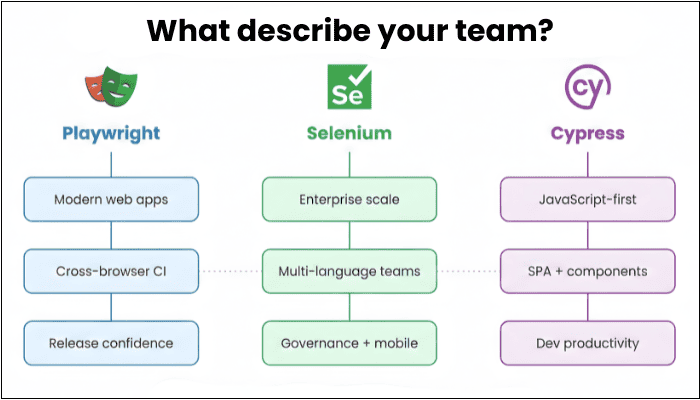
Playwright
Best when you need modern, scalable end-to-end automation with strong cross-browser coverage and fast CI feedback.
Common fit:
- Modern web apps shipping frequently
- Cross-browser coverage is non-negotiable
- You want parallel execution + strong debugging artifacts (trace/video/screenshots)
Must Read: Playwright Automation Guide 2026
Selenium
Best when you need maximum flexibility, enterprise patterns, multi-language alignment, and legacy/system constraints.
Common fit:
- Multi-language orgs (Java/Python/C#/etc.)
- Heavily governed environments and grid-based scale
- Legacy constraints, deep customization, and mature ecosystem patterns
- Works well with Appium for real-device mobile automation
Cypress
Best for frontend-heavy teams who want fast developer feedback and a smooth local testing loop.
Common fit:
- JavaScript-first teams
- UI validation during early and mid-stage development
- Fast feedback on SPAs and frontend workflows
If you need a true “tool-by-tool breakdown” with tables and benchmarks, link here:
Read the full comparison →
The Real Failure Mode: Automation Without a System
Most automation programs don’t fail because of the tool. They fail because the system around the tool is missing:
- No ownership model (who fixes what, by when)
- No test strategy (what to automate vs what to keep manual)
- No suite health discipline (flakiness, selector strategy, reporting)
- No CI standards (parallelization, gating rules, failure triage)
- No maintenance plan (tests rot as the product evolves)
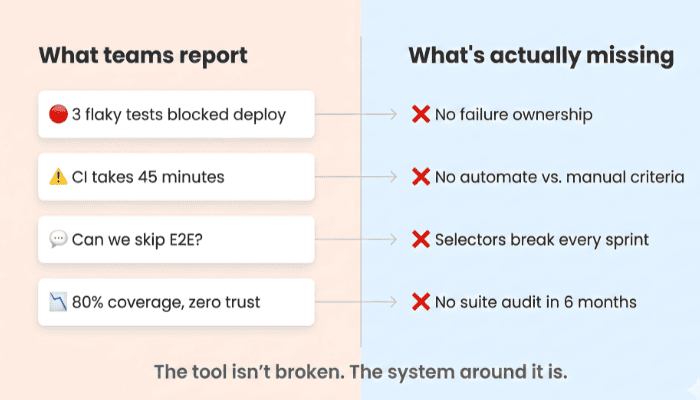
Automation without structure becomes noise. Noise becomes a risk.
Common Automation Mistakes (And How to Avoid Them)
- Automating Everything: Not every test should be automated.
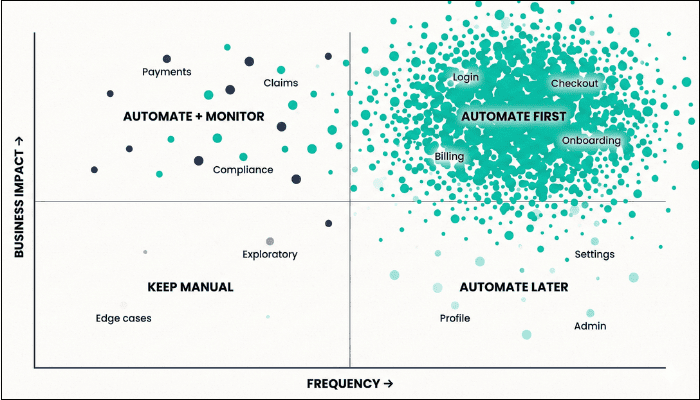
A simple starting rule: if a test is executed more than 10 times, it’s a strong candidate for automation. Otherwise, manual testing may deliver more value.
Better approach: Automate high-frequency, high-impact workflows first (login, checkout, billing, policy issuance). Keep exploratory scenarios and low-frequency edge cases manual. - Ignoring Test Maintenance: Automation isn’t “set it and forget it.” Tests must evolve alongside the product or they become liabilities.
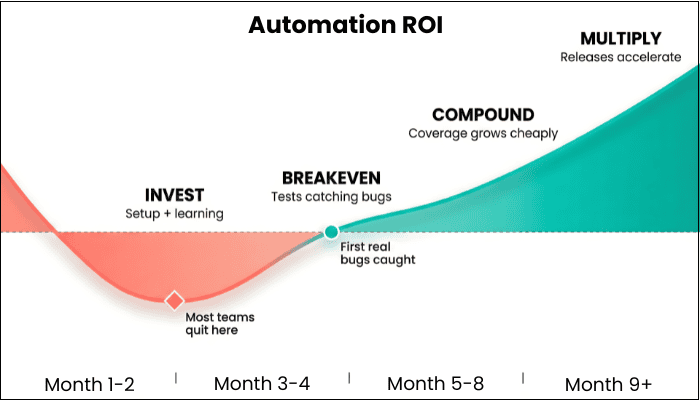
What works in practice: Set a suite health routine (weekly or biweekly): review flaky failures, retire low-value tests, stabilize selectors, and keep CI signals clean. - Treating Automation as a One-Time Project: QA automation is a system, not a milestone. Teams that treat it like a checkbox effort rarely see sustained ROI.
Recommended: Treat automation like a product capability with owners, quality gates, and continuous improvement. Build it into sprint routines, not “someday” cleanups. - Choosing Tools Before Defining Process: Without clear workflows, ownership, and standards, even the best tools fail to deliver consistent results.
Fix: Define the operating model first: what becomes a release gate, what runs nightly, how failures are triaged, who owns fixes, and what “green” actually means. - Underestimating the Importance of Talent: Strong automation requires experienced engineers who understand both testing and the product—not just the framework.
A smarter move: Staff for quality engineering (risk thinking + technical depth). Tools are accelerators only when the team can design stable tests and maintain them over time.
How ThinkSys Builds Automation That Holds Up
Automation Designed for Real-World Software Teams
Our approach is intentionally different:
- Long-tenured QA engineers (not rotating contractors)
- Structured frameworks that scale with fast-moving codebases
- A pragmatic approach to what to automate—and what not to
- Flexible engagement models—from fractional support to full automation builds
- A Zero Serious & Critical Bugs guarantee—because quality should be measurable
- CI-ready execution + suite health metrics (flake rate, runtime, failure reasons, release confidence)
We don’t push a preferred tool. We design systems that protect production, release after release.
How to Evaluate Your Next Step (Fast)
If you’re unsure where to begin, start with a short working session:
- Identify top 5–10 customer-critical flows
- Map risk areas (frequency × impact × change rate)
- Decide what becomes a release gate vs. what stays manual
- Choose the tool(s) that best fit those requirements
- Validate with a small, time-boxed POC
This avoids months of experimentation and ensures your automation strategy aligns with your product reality.
Evaluating Automation Tools? Let’s Start With Your Risk Profile.
If you’re comparing Playwright, Selenium, or Cypress, you’re already thinking seriously about quality. We help teams turn that intent into a QA system that holds up in production.

FAQ's
- Playwright — Best for modern web apps. Fast CI, cross-browser support, strong debugging tools. Good fit if you ship frequently.
- Selenium — Best for enterprise setups with multiple languages (Java, Python, C#), legacy systems, or regulated industries. Also connects to Appium for mobile testing.
- Cypress — Best for JavaScript teams building single-page apps who want fast feedback during development.
- Brittle selectors — Tests rely on CSS classes or element paths that change when the UI gets a visual update, even if the functionality stays the same. Fix: use stable data-test attributes.
- Bad test data — Tests depend on specific database states that drift over time. When test data goes stale, tests fail for no real reason.
- No ownership — Nobody is responsible for fixing broken tests quickly. When failures sit longer than 48 hours, teams learn to ignore them. Once that happens, the whole suite loses trust.
Share This Article:
 Previous Post