
Free Webinar, Oct 27Stop your AI agents from writing flaky playwright tests.
Free Webinar, Oct 27Stop your AI agents from writing flaky playwright tests.
You’re probably here because you’re trying to choose the right test automation tool for your team/projects. Maybe you’re starting fresh with automation testing, or maybe your current setup is not helping you. Either way, the decision feels big because the wrong test automation tool can slow everything down, and the right one can make software testing a strength instead of a struggle.
But here’s the problem: on paper, almost every test tool looks great. And they all promise almost the same features.
So how do you actually choose?
The usual advice is to try it in your own workflow. But trialing three or four tools in parallel is expensive.
That’s why we wrote this guide. We’ve worked with many teams/projects across different industries and helped them integrate Playwright, Cypress, and Selenium in production environments. In this detailed comparison guide we’ll compare playwright vs cypress vs selenium, to help you decide which testing framework suits your project best.
We've helped teams across industries integrate Playwright, Cypress, and Selenium in production environments. You’ll get a clear look at what each tool is good at, where it falls short, and what difficulties you’ll need to face with direct comparisons, architecture deep-dives reviews, and real data to help you make the right choice for 2026.
If you’re not sure where to start, you can use this high-level scenario table to quickly match your needs to the best test automation tool. This will help you make the decision in the quickest amount of time.
Scenario | Best Tool | Why |
| Multi-language, legacy browsers | Selenium | Broadest support; proven in enterprise and legacy apps. |
| Fast JS testing, modern web apps | Cypress | Easiest onboarding, best for JS teams, fast feedback. |
| Full E2E, parallel, scalable, modern stack | Playwright | Powerful, cross-browser, advanced debugging, future-proof. |
| Next-gen (AI/Visual/Component/Cloud) | Playwright | Rapid innovation, modern features, best for scaling. |
| Mobile browser or Safari support | Playwright, Selenium | Best Safari emulation; Selenium + Appium for full device coverage. |
| Need grid-scale, lowest friction for legacy | Selenium | Unmatched for rare/old browsers and language diversity. |
| True mobile app or device testing | Appium (with Selenium | Industry standard for native, hybrid, and mobile web apps on real devices. |
Note: Playwright and Cypress only emulate mobile browsers on desktop environments. For true mobile automation, use Appium (often paired with Selenium or WebdriverIO).
However, if you want to compare features of each tool side by side, the table given below will help you.
While making this table, we noted down each feature which teams might be looking for an automation tool. So we listed down all those criteria that could help you make the right decision between playwright, cypress and selenium. Just show this detailed feature-wise comparison to your technical team, and this table helps technical leads assess key fit criteria before selecting a right test automation tool.
Feature | Selenium | Cypress | |
| Language Support | Java, Python, C#, JS, Ruby, PHP, Perl | JavaScript/TypeScript | JS/TS, Python, C#, Java |
| Browser Support | All major (Chrome, Firefox, Edge, Safari), legacy (IE, now deprecated) | Chrome, Edge, Firefox, WebKit (improving) | Chrome, Firefox, WebKit/Safari |
| Parallel Execution | Yes (Grid / cloud / CI setup) | Yes (Cloud / Dashboard / CI) | Yes (native, simple, scalable) |
| Record/Playback | Selenium IDE | Cypress Studio | Codegen |
| Flakiness Handling | Wait strategies, WebDriver BiDi/CDP integrations, third-party healing tools | Auto-retry, auto-wait | Auto-waiting, retry, tracing, stable locators |
| CI/CD Integration | Strong but more setup effort | Simple, developer-friendly | Excellent, modern pipelines ready |
| Visual Regression | Plugins, AI-powered third-party tools emerging; no native | First-party plugins/Dashboard; no native | Native (built-in tracing, screenshots, video) |
| Mobile Emulation | Appium (real devices, native/hybrid/web), and limited browser emulation via drivers | Responsive viewport only (no real device automation) | Emulates mobile browsers (no real devices/apps) |
| Component Testing | No | Yes (React, Vue, Angular) | Yes (JS/TS; growing ecosystem) |
| Network Stubbing | Yes (BiDi / CDP / proxies) | Yes | Yes |
| Community Size | Largest, 31k+ companies, 25% market share (2026) | Large frontend ecosystem | Fastest-growing modern ecosystem |
| Open Source | Yes | Yes | Yes |
It’s important to distinguish between mobile emulation (simulating mobile viewports) and real device automation.
Note: If your test strategy requires true mobile device automation, Appium or WebdriverIO (for TypeScript) are the best options.
Appium provides cross-device testing, can run on real devices, emulators, and simulators, and supports most major programming languages.
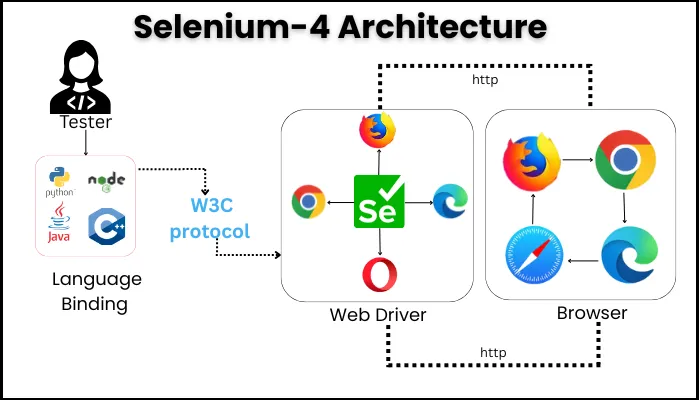
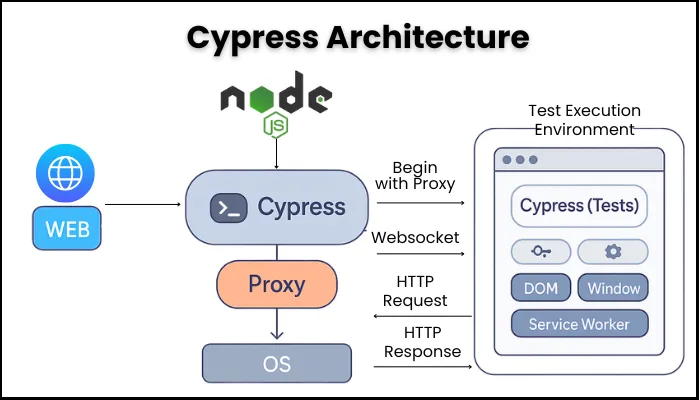
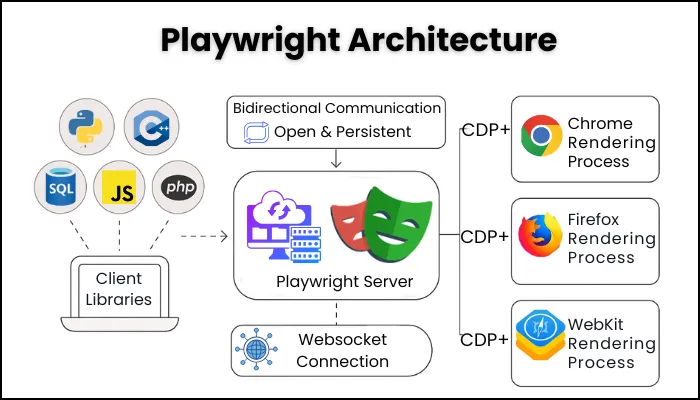
No worries if you want to get more technical, and looking for a long term option. In the following section, we have discussed the architecture of each tool and how each tool works.
Framework selection used to be about developer experience, language support, and CI behavior. Pick the tool your engineers like, make sure it runs cleanly, move on. That was reasonable when tests were entirely human-written and human-maintained.
AI tooling changed both assumptions at once. Copilot, Cursor, Claude Code, and purpose-built QA agents are now part of how teams write and maintain tests, and they do not perform equally across frameworks. Playwright's TypeScript-native architecture and clean async API give AI generation tools a surface they can work with reliably. Selenium's verbose, Java-influenced patterns produce output that needs significant correction before it ships. The gap shows up in how much AI-generated test code actually ships versus how much gets thrown out and rewritten by hand.
That's a cost that didn't exist in any framework comparison written before 2023. Selecting a framework now means selecting how much leverage your team gets from the AI tools they already use every day.
There's also a scaling dimension that existed before AI and still matters independently: the choice that looks fine at 30 engineers shows its real cost at 80. CI runs get longer, flaky-test maintenance absorbs sprint capacity, and the suite that shipped fine becomes a recurring tax on delivery. Select for how a framework behaves under scale, not just in an evaluation.
One of our clients, Boostlingo, came to us with a stack that was completely sensible when it was built. By the time we sat down, it was slowing every release and blocking the AI-assisted workflows their engineers were already using. The framework hadn't gotten worse, the world around it moved, and the stack hadn't moved with it. Migrating to Playwright delivered 25% faster test script delivery without quality regression.
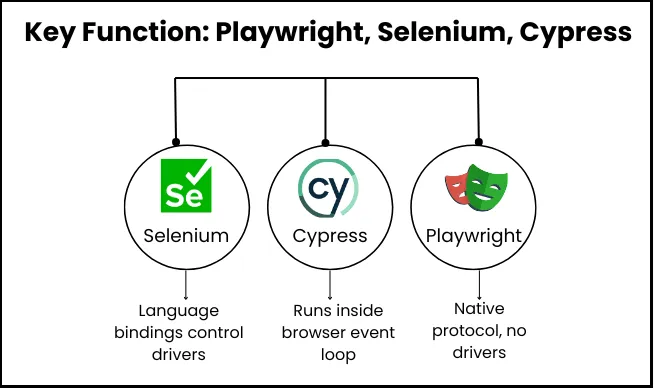
Before finalizing any particular tool, you should know how each tool works. Because even without using the tool, you can get a glimpse whether it is the right tool for your use case. Also, you’ll know that if you ever encounter errors then how you can fix those or whether your team has the expertise to solve them on their own.
| Tool | How It Works |
| Selenium | Uses language bindings to send commands via the WebDriver protocol (W3C & BiDi) to browser drivers (e.g., ChromeDriver), which control browsers. Grid enables distributed runs. |
| Cypress | Executes test code inside the browser event loop alongside your app, allowing deep access to the DOM and network. No external driver needed. Super fast, but limited to JS/TS and a subset of browser features. |
| Playwright | Test code (JS/TS, Python, Java, C#) talks to the Playwright library, which directly controls browsers via native protocols (Chrome DevTools, WebKit, Firefox). No drivers. Deep, parallel, isolated control, all built-in. |
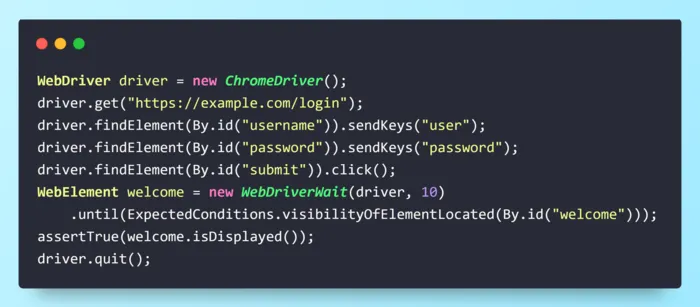
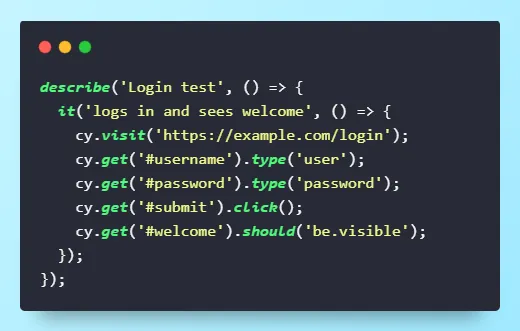
It’s much easier to compare tools when you see the same scenario coded in each. Below: a real login-and-verify test, written for Selenium, Cypress, and Playwright. Notice how the syntax, wait handling, and code length differ.
See how the same “login and verify welcome” scenario looks in each framework.
Playwright (TypeScript)
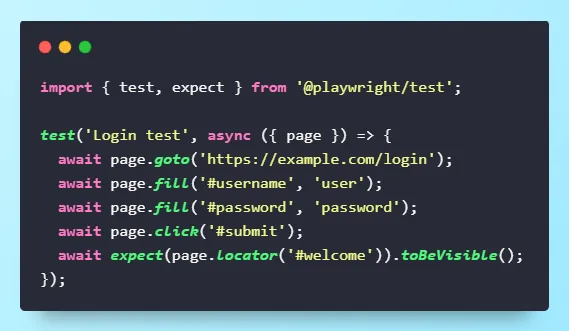
Key Takeaways: Playwright and Cypress are concise and handle waits for you; Selenium requires more setup but can now do auto-waits (with BiDi, v4+).
waitFor statements, or network interception when you need to mock APIs. Read Also: Why Tech Leaders are moving from selenium to playwright
Features and architecture are good but what about the usage trends. If you also have this question, then the following table will be extremely useful to you. We have segmented each tool based on its most recent usage. You’ll know exactly what other are choosing and why.
| Tool | GitHub Stars | NPM All Time Downloads | StackOverflow Qs | First Released | Update Pace |
| Selenium | 34,000+ | 2.5M+ | 160000+ | 2004 | Mature, steady |
| Cypress | 48,000+ | 9M+ | 19,000+ | 2017 | Fast, steady |
| Playwright | 78,000+ | 45M+ | 16,000+ | 2020 | Rapid, innovative |
Sources: npmtrends, GitHub Selenium, GitHub Cypress, GitHub Playwright,
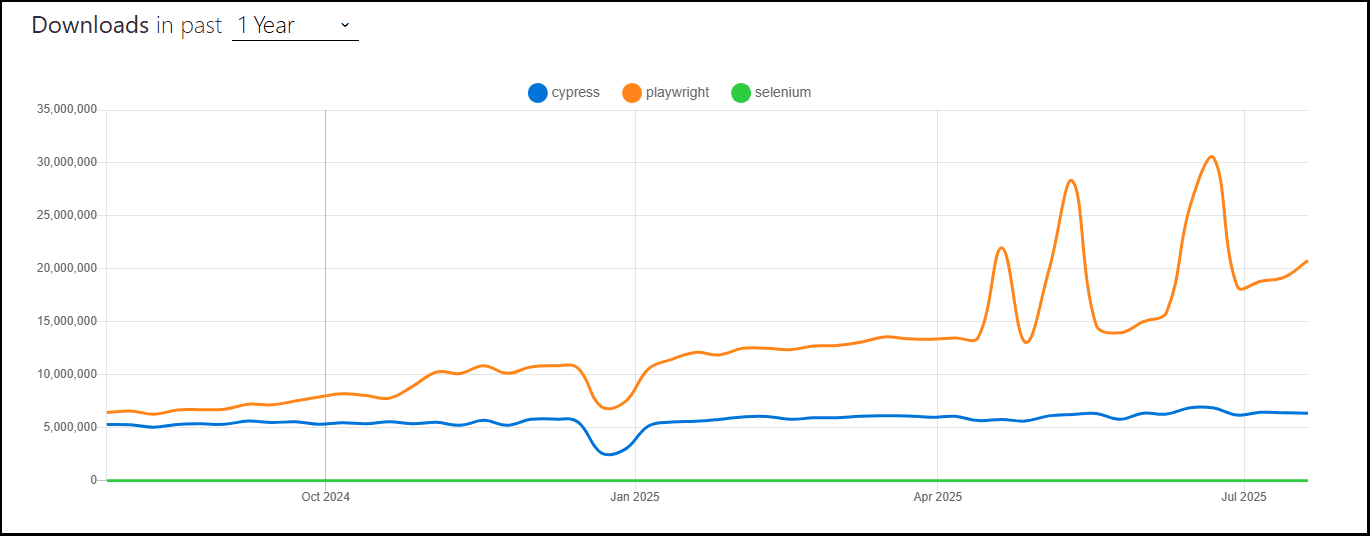
Source : npm trends - playwright vs cypress
When you truly integrate the tool in your environment, you get to see the actual performance as to how fast or slow it is. This quick analysis will give you a solid idea that which tool is ideal for use case when it comes to integrating in your workflow.
| Scenario | Selenium | Cypress | Playwright |
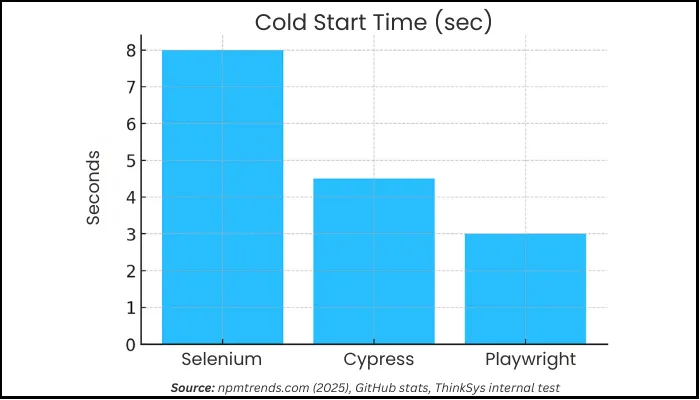
| Cold Start (sec) | 6-10s | 3-6s | 2-4s |
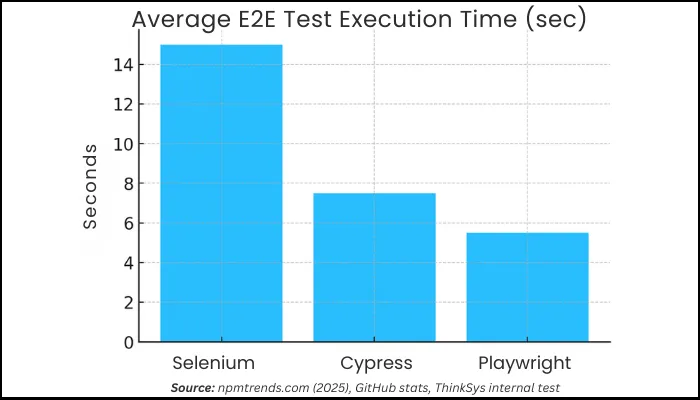
| Avg. E2E Test (sec) | 10-20s | 5-10s | 3-8s |
| Flakiness | Higher | Low | Lowest |
| Native Parallel | Grid required | Paid Cloud/DIY | Yes, built-in |
| Trace/Video Debug | Plugin/manual | Built-in | Built-in |
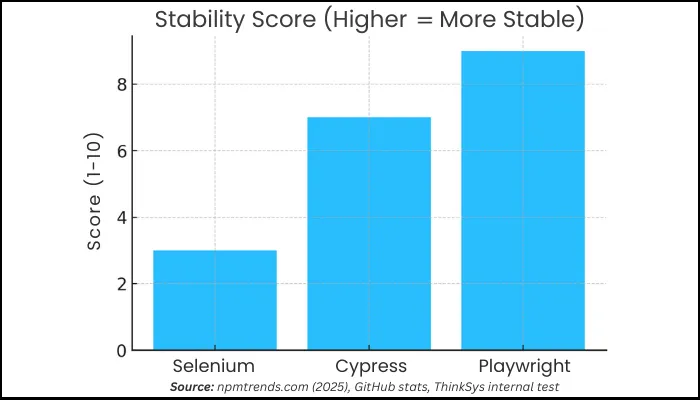
Note#1: Automated testing can reduce cycle times by up to 60% and deliver 400%+ ROI.
Note#2: State of JavaScript 2025 ranked Playwright #1 on both satisfaction and retention across browser-testing frameworks.
Migration fixes surface symptoms fast. The first month feels like success: flaky failures drop, execution speeds up. Then the deeper problems return, because they were never framework problems: brittle selectors, leaking test data, poorly isolated environments, tests covering too much in one path. These travel with the suite into whatever framework receives them.
Playwright doesn't eliminate those, it gives you a clean baseline to build the right architecture on. What you build determines whether the gains last past the first quarter.
The AI risk to know: Teams that migrate to Playwright and immediately use AI to generate tests at volume can rebuild bad patterns faster than they could manually. AI accelerates whatever design philosophy is already in place: sound philosophy compounds the benefit, poor philosophy compounds the debt. Boostlingo's 25% gain came from treating migration as an architecture project first, then introducing Copilot/Cursor after the foundational patterns were set. That sequence mattered as much as the tools.
Read also: Why tech leaders are migrating from Selenium to Playwright
The Playwright MCP (Model Context Protocol) server is a significant development in the Playwright ecosystem that extends the framework beyond traditional test automation into AI-assisted browser control.
What it does:
Playwright MCP server allows AI agents including Claude (Anthropic), GitHub Copilot, and other LLM-based tools to control a real browser using natural language instructions. Instead of writing explicit `page.click()` or `page.fill()` commands, an AI agent can interpret a prompt like "log into the app and navigate to the billing page" and execute it via Playwright.
Key capabilities:
How to set it up:
When to use Playwright MCP vs. traditional Playwright tests:
| Scenario | Recommended Approach |
| Regression test suite (repeatable, version-controlled) | Traditional Playwright tests |
| One-off data extraction or QA exploration | Playwright MCP |
| AI-driven test generation (then convert to code) | Playwright MCP → export to .spec.ts |
| Automated CI/CD pipeline | Traditional Playwright tests |
This is still an emerging capability, but if your QA team is exploring AI-assisted testing workflows, Playwright MCP is the entry point to watch in 2026.
If you hold a C-suite position and want to make a quick decision based on your initial requirements, this table will help you. It quickly tells you which tool is best and why.
| If you are | Choose | Because |
| Starting any new browser automation | Playwright | Scaling behavior, team fit, ecosystem direction, and AI-tooling compatibility all point the same way. It no longer needs to justify itself. |
| Running a large, functioning legacy estate | Stay on Selenium (for now) | If migration would harm roadmap more than current suite pain, but set a real migration date so the hold doesn't become permanent. |
| Building on a genuinely narrow product surface | Cypress | Only if cross-origin/third-party constraints won't become strategic problems as you grow. Map your 12-month coverage needs first. |
| Exploring AI-assisted testing | Playwright + MCP | Clean TypeScript API gives AI tools a reliable surface; highest acceptance rate on generated tests. |
In case, you haven’t found the information you were looking for and could not make a choice between Playwright, Cypress & Selenium, then you need to go through this quick checklist. What you need to do next is just sit with your teams and ask these questions one by one:
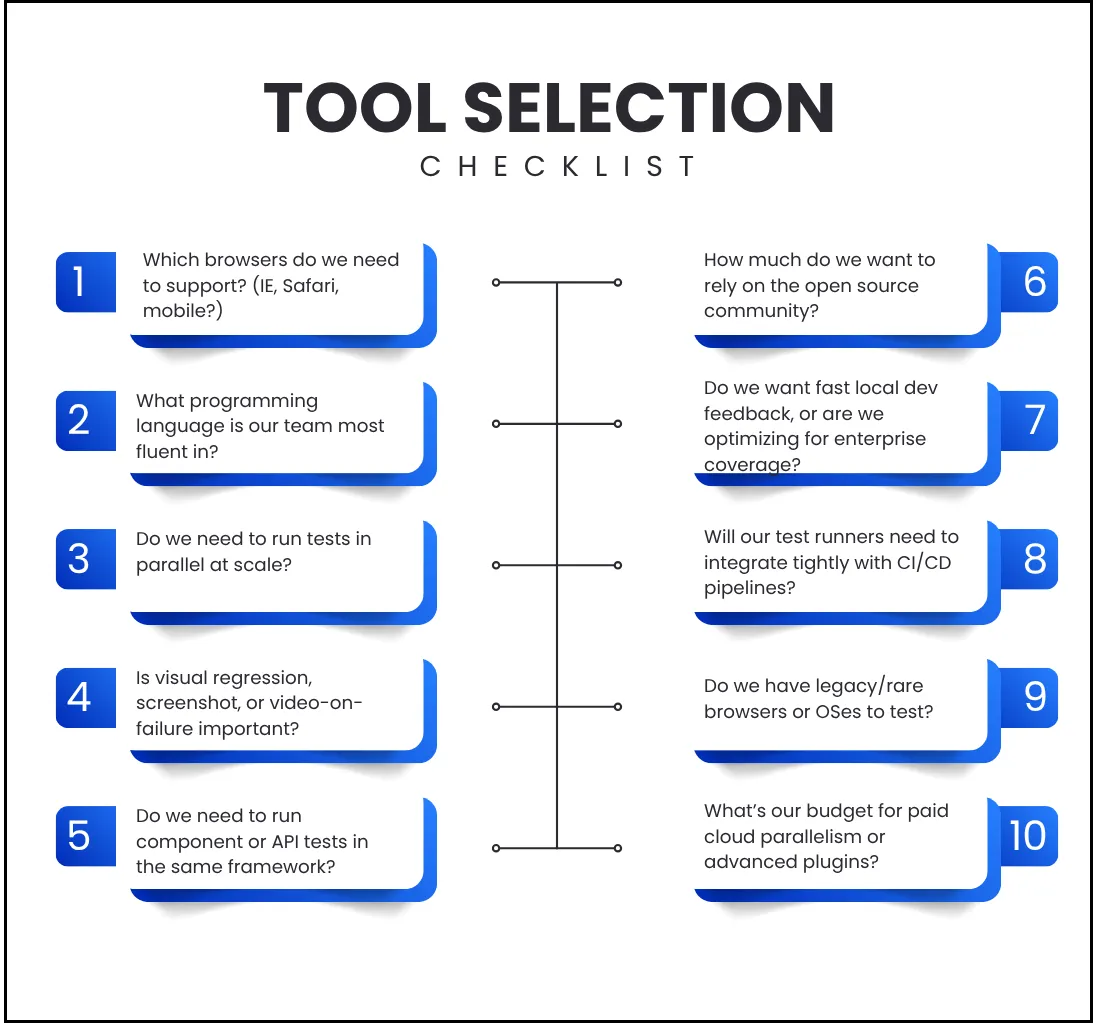
This process might take time but this is by far the best approach if you’re looking to find the right tool in terms of performance and long term vision.
The framework is the foundation, but choosing it is the beginning of the decision, not the end. The teams that hold the gains from a Playwright migration own a selector strategy, test-data isolation, regression tiering, and flaky-test remediation with clear accountability. Without that, a better framework just becomes the same maintenance problem running in a faster runtime.
An empirical study found developers spend ~1.28% of their time fixing flaky tests roughly $2,250/month in maintenance cost. The right tool paired with the right architecture turns testing into an accelerator instead of an obstacle.
That’s why this decision should be about choosing a tool that fits your product, your team, and your daily development.
We've helped teams across industries pick and implement the right automation tool. FreshTracks Canada partnered with us to modernize their QA, getting faster releases and more stable runs. If you're weighing Playwright, Selenium, or Cypress, our QA experts can help.
Free proof-of-concept demo for the first 10 customers who sign up. Tell us your current setup, CI pipeline, and pain points, we'll help you make a decision that moves your team forward.

About the Author
Harsh Goel
Sr. Technical Content Writer at ThinkSys with 10+ years of experience


