Top 10 Automated Testing Tools for Enterprise Applications: Comprehensive Review
As modern corporations increasingly rely on complex, interconnected suites, the traditional practices of manual testing have become a liability.
One major truth to realize is that manual regression testing cannot scale to meet modern enterprise delivery demands.
While testing, you may witness your QA team getting trapped in endless test cycles and delaying releases because testing discovers problems at the last minute.
When it comes to automation testing for enterprise applications, the primary aspect is selecting the right tools. However, that’s the part where the majority of the teams make mistakes.
The challenge here isn’t finding a testing tool; it’s that no single tool elegantly handles the entire testing area. Choosing the wrong tool can result in fragile test suites, ballooning maintenance costs, and false confidence in release readiness.
With that in mind, you need a helping hand while shortlisting tools for your enterprise software as per your demands. In this article, you’ll get to know the top automated testing tools for enterprise software, examining each one in detail.
Understanding Your Existing Enterprise Automation Maturity
Rather than jumping directly into individual tools, take a moment to assess where your organization sits in automation maturity. If you’re building automation for the first time, you likely don’t have any established framework and teams with mixed skill levels. In case you’ve been automating for years, you probably recognize the friction points such as maintenance overhead, tool fragmentation, scalability issues, and technical debt.
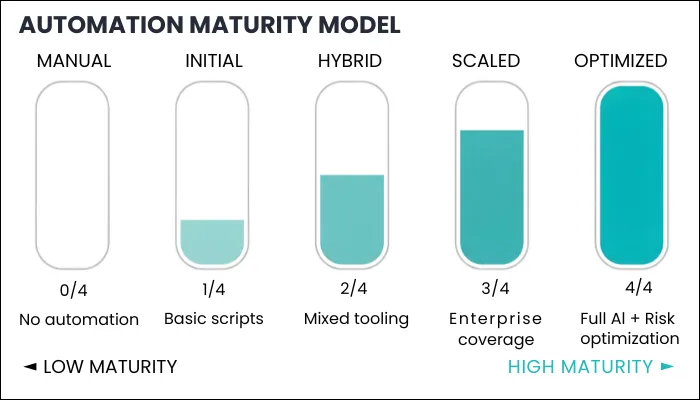
What you will discover as you mature is that most successful enterprises don’t standardize one single tool. Instead, building a hybrid foundation is the way to go.
Open-source frameworks for your web apps, combined with commercial platforms that can handle your enterprise apps, is the approach that takes automation testing on a successful path.
The real impact of your tool choice isn’t felt in the first month, but you can notice its impact in six months when you’re maintaining hundreds of tests, in year two when you’re supporting three major enterprise apps, and in year three when you need to need to explain stakeholders why your organization is spending 40% of its time maintaining tests instead of writing new ones. In short, your tool selection shapes your automation program’s path more than any other decision you make.
Top Automation Testing Tools for Enterprise Applications
Using the right automation testing tools will enhance the overall quality of your enterprise software while saving time and effort in testing. The following is a specially curated list of the top automated testing tools that ensure your QA task is error-free while leveraging resources efficiently.
| Tool | Key Feature | Best For | Work Style |
|---|---|---|---|
| Tricentis Tosca | Model-based testing | Large ERP systems | Process modeling |
| Opkey | ERP test library | Cloud ERP teams | No-code AI |
| TestComplete | Multi-platform testing | Mixed applications | Record + script |
| Ranorex Studio | Shared object repo | GUI-heavy apps | Low-code |
| ACCELQ | Business flows | SaaS ecosystems | No-code |
| Virtuoso QA | NLP automation | AI-first teams | Natural language |
| Katalon Studio | All-in-one platform | Fast adoption | Low-code |
| Leapwork | Visual flows | Non-technical testers | Flowcharts |
| Selenium | Browser control | Engineering teams | Code-first |
| Playwright | Modern web | Web developers | Code-first |
1. Tricentis Tosca
Developed by Tricentis, Tosca is widely recognized as the top solution for large-scale enterprise environments that require robust testing of heterogeneous application landscapes. Its primary differentiator is its Model-Based Test Automation (MBTA), which departs from traditional script-based methods by separating the automation logic from the underlying technical identifiers of the application.
With this architecture, you can create a digital twin of the application’s user interface or API. Everything the app’s code changes, you can update the central model once, and all associated test cases are automatically synchronized, drastically reducing the maintenance overhead.
Consider testing an order-to-cash process. Instead of creating individual tests for each scenario, you create a model describing the process with decision points, branches, and validation points. From this model, this tool will automatically generate hundreds of test variations by exercising different paths through the process.
This abstraction provides genuine value:
- Reduced Brittleness: Created tests are expressed at the business level, not the UI interaction level. When UI layouts change, your model remains valid.
- Coverage Optimization: Tosca analyzes the model to identify high-risk execution paths and prioritizes testing there.
- Non-Technical Contribution: Business stakeholders can define process models without writing test scripts.
Packaged Application Expertise
Tosca’s pre-build integrations for packaged applications are remarkable:
- SAP: Deep support for SAP GUI, Fiori, ECC, S/4HANA, and specific modules (FI, MM, SD, HR).
- Oracle: Oracle EBS, Fusion, and related modules.
- Salesforce: Comprehensive automation, including configuration and customization.
- Workday: HR and Finance module automation.
- Siebel, JD Edwards, Infor: Support for other major enterprise suites.
This pre-build knowledge dramatically accelerates automation. Rather than learning that SAP uses specific UI technologies and building locator strategies, Tosca already understands these systems.
Risk-Based Test Optimization
Tosca analyzes change impact and focuses testing on areas most likely affected by recent changes. During upgrade cycles, this capability is invaluable. Rather than running the full regression suite against every minor version update, this tool recommends a targeted suite validating the most probable failure points.
Concerns You Should Consider
- Steep Learning Curve for Model-Based Testing: The shift from script-based automation to Tosca’s model-based approach requires a mindset change. Teams unfamiliar with this methodology may take time to become productive.
- Dependency on Vendor Ecosystem: Many advanced capabilities are tightly coupled to Tricentis products, increasing long-term vendor dependency.
- Overkill for Smaller Systems: For applications without deep integrations or SAP-heavy workflows, Tosca can be more complex than valuable.
Pricing
Even though pricing is typically quote-based and operates on a modular licensing structure that includes named and concurrent users, as well as execution agents, it may be similar to the following:
| License Type | Annual Estimated Cost | Intended Use Case |
| Named User (Enterprise) | $3,500 - $5,000 | Dedicated QA engineers and developers. |
| Concurrent User (Enterprise) | $6,000 - $10,000 | Shared usage across global time zones. |
| Execution Agent | $1,000 - $2,000 | Parallel testing and CI/CD integration. |
| Custom Add-on Modules | $2,000 - $4,000 | Specialized BI, SAP, or Mobile testing. |
Choose Tosca When:
- Your organization runs SAP S/4HANA, Oracle EBS/Fusion, Salesforce, or other major packaged suites.
- Your testing burden covers thousands of business scenarios.
- You're building a Test Center of Excellence with standardized tooling.
- Upgrade cycles and release management are frequent quality risks.
- Your enterprise has a budget for substantial tooling and implementation investment.
2. Opkey
Opkey has established itself as a dominant force in the ERP testing segment by focusing on the specific pain points of recurring cloud application updates. While it supports over 12 ERP platforms and 150 technologies, its alignment with the Oracle ecosystem is considered best-in-class. In addition, Opkey’s architecture is built around AI-Powered Test Discovery, which mines an organization’s configuration and process logs to automatically identify the actual business processes being run.
All this removes the need for weeks of manual documentation and allows organizations to instantly spot gaps in their current test coverage.
Unique Features
- Pre-Build Test Cases: A critical feature of Opkey is its library of over 30,000 pre-built automated test cases. When you’re undergoing a migration to Microsoft Dynamics, you can use this library as it offers a ready-to-go regression suite that can be deployed in hours.
- Chatbot: The Wilfred chatbot, powered by a proprietary ERP language model, allows non-technical users to generate test cases and support documentation using natural language commands.
Concerns You Should Consider
- Strong Focus on ERP-Centric Use Cases: Opkey shines in ERP and packaged application testing, but may feel limiting for highly customized or non-standard enterprise systems.
- Customization Boundaries: Advanced or unconventional testing scenarios may be difficult to implement without working around platform constraints
Pricing
Opkey doesn’t reveal its pricing publicly, as it creates a custom program as per your requirements. You need to connect with Opkey’s support to get accurate pricing.
Who Should Use Opkey
Organizations heavily invested in Oracle Cloud, Workday, or SAP that are struggling with the maintenance burden of frequent quarterly updates.
3. TestComplete
If your enterprise application runs on various platforms, including Windows, web apps, mobile devices, and some packaged systems, then TestComplete is one of the few tools that can handle multiple platforms from a single platform.
Developed by SmartBear, TestComplete is a commercial automated testing tool that has maintained a strong enterprise presence due to its exceptional object recognition engine. The platform’s Intelligent Quality add-on uses AI to handle objects with dynamic IDs and can even test complex grids, charts, and PDFs that often break traditional locators.
Technology Coverage
With TestComplete, you can automate:
- Windows Desktop Applications: VB.NET, WinForms, WPF, VCL, Delphi, or virtually any Windows UI framework.
- Web Applications: JavaScript frameworks, HTML5, and progressive web apps.
- Mobile: Native iOS, Android, and hybrid applications.
Integration Advantages
If you’re using other SmartBear tools, integrating TestComplete becomes seamless. API tests created in ReadyAPI can be called from TestComplete UI tests, and test results automatically populate your test management system.
Maintenance Reality
While AI object recognition helps, maintenance still represents 20-30% of your QA effort in large programs. The promise of record once, run forever rarely matches reality as applications change and new versions require continuous care.
Concerns You Should Consider
- Licensing Can Become Expensive at Scale: As your teams grow and parallel execution increases, licensing costs can rise quickly, especially in large enterprise programs.
- Object Recognition Requires Discipline: While powerful, TestComplete’s object recognition can lead to brittle tests if object naming and repository management are not handled carefully.
- Vendor Dependency for Advanced Capabilities: Certain integrations and advanced features depend heavily on the SmartBear ecosystem.
Pricing
TestComplete has three different pricing options. In the base plan, you can choose the platforms on which you want to test your enterprise apps. You can choose one or more platforms, and the pricing starts at $2058 and $4108 for fixed and floating plans, respectively. The TestComplete Pro plan covers all the platforms along with access to TestExecute, and this starts at $4799 for a fixed plan. If you have some unique requirements, you can always connect with TestComplete’s sales team to get a custom quotation.
When TestComplete Makes Sense
TestComplete can be your preference if:
- You want multi-platform testing from one tool without building custom frameworks.
- Your team includes non-technical testers who would benefit from record-and-playback.
- You're already using other SmartBear tools and want ecosystem integration.
- Vendor support and professional services are valuable to your organization.
4. Ranorex Studio
Ranorex is a mid-market commercial tool that occupies interesting territory: more accessible than TestComplete to non-technical users, but more powerful than pure record-and-replay tools. In case you’re seeking codeless capabilities for business testers plus extensibility for sophisticated scenarios, then Ranorex is worth considering.
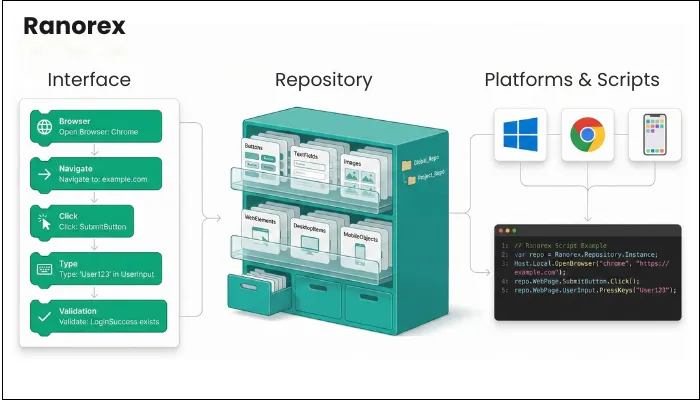
One of the highlights of Ranorex is its centralized repository for UI element definitions. Rather than each test maintaining its own locators, all element definitions live in one place. When your application’s UI changes, you update the repository once, and all tests using that element immediately benefit, reducing maintenance overhead.
In addition to that, Ranorex supports both codeless testing and script-based extensions. The dual approach allows you to build core test logic while automation engineers can extend tests with sophisticated validation.
What Ranorex Covers
The coverage in Ranorex is respectable but narrower than TestComplete. You can automate:
- Windows Desktop Applications: WPF, WinForms, MFC.
- Web Applications: Modern browsers and JavaScript frameworks.
- Mobile: iOS and Android native and hybrid applications.
Concerns You Should Consider
- Primarily Strong for GUI-Centric Testing: Ranorex excels at desktop and GUI automation but is less optimized for API-first or microservices-heavy architectures.
- Desktop Bias May Limit Future Scalability: Enterprises moving aggressively toward cloud-native and API-driven systems may find Ranorex less aligned with long-term architecture goals.
- Advanced Scenarios Still Require Technical Skills: Despite low-code capabilities, complex enterprise workflows often demand experienced automation engineers.
- Limited Flexibility Compared to Open Frameworks: While Ranorex supports coding, its structure may feel restrictive to teams used to building highly customized frameworks.
Pricing
Ranorex recently introduced subscription licensing alongside perpetual licenses:
- Perpetual Licenses: One-time purchase ($2,256-$4,650 depending on edition).
- Subscription Licenses: Annual subscription ($800-$4,000 depending on edition and user count).
The subscription model is more accessible to smaller teams or those with variable testing needs.
When Ranorex Fits Your Organization
Ranorex is suitable for your organization if:
- Your team includes both technical automation engineers and non-technical QA practitioners.
- The applications you build are primarily Windows and web-based.
- You want codeless capabilities without TestComplete's cost.
- Your organization prefers mid-sized vendors.
- You can accept narrower technology coverage for easier use.
5. ACCELQ
ACCELQ represents a new gen of AI-first testing platforms designed to be entirely cloud-based and focused on the rapid automation of SaaS ecosystems. The ACCELQ Universe provides a visual representation of the entire application, mapping dependencies between various modules. Using ACCELQ Universe, you can see how a change in one SaaS ecosystem might impact the downstream of another SaaS integration.
The platform is strictly no-code, utilizing a natural language logic editor that empowers full-stack teams to collaborate on the same platform. The Autonomous Self-Healing feature is another advanced feature of this tool. It uses machine learning to identify when UI elements change and automatically updates the test script to ensure execution continues without interruption.
Rather than thinking in test steps, ACCELQ encourages thinking in business processes. You describe business scenarios, and the tool generates the automation. The business-first design is powerful for collaboration between QA and business stakeholders.
Other Features of ACCELQ
- Multi-Channel Coverage: One platform for web, mobile, desktop, API, and packaged apps reduces tool fragmentation.
- Cloud-Native: SaaS delivery means no infrastructure management.
- Natural Language Programming: Tests expressed in near-English, readable even to business stakeholders.
- Detailed Reports: With ACCELQ, you get access to detailed insights on test development and execution status.
Concerns You Should Consider
- Custom Pricing: ACCELQ doesn't publish pricing; it's custom per enterprise. Evaluation requires direct vendor engagement.
- Vendor Lock-In Risk: The tightly integrated platform creates significant switching costs once embedded.
- Shallower Expertise than Specialized Tools: While ACCELQ covers multiple platforms, its depth on any single platform is less than specialized tools.
- Learning Curve for Advanced Scenarios: Advanced scenarios require learning ACCELQ's advanced capabilities.
- Relatively Young Platform: ACCELQ is newer than Tosca or TestComplete. While production-ready, the enterprise deployment history is limited.
When ACCELQ is Right for You
You can go with ACCELQ when:
- You want multi-channel coverage from a single platform and can accept some depth trade-offs.
- Your team includes non-technical testers who benefit from codeless capabilities.
- You're building a new test automation program, wanting modern SaaS delivery.
- You value integrated platforms over best-of-breed tools.
6. Virtuoso QA
Virtuoso QA represents the most aggressive AI-first approach to test automation. The platform leverages NLP, machine learning, and automation to enable test automation without test engineers. With its NLP-driven test creation, all you have to do is describe what you want to test in near-natural English, and it parses the description to perform the actions through automation. All this eradicates the need to click through UI elements or write test scripts.
Not to forget its self-healing capability. When UIs change, the AI adjusts test scripts with 95% accuracy, which reduces maintenance effort dramatically compared to manual locator management. While the primary experience is codeless and NLP-driven, Virtuoso supports low-code extensions when edge cases or complex logic require it.
Other Features of Virtuoso AI
- Reduction in Test Creation Time: NLP-driven creation is faster than manual test coding for straightforward scenarios.
- Reduction in Maintenance Effort: Aggressive self-healing means fewer person-hours updating broken tests.
- Accessibility to Non-Technical Users: Truly enables business stakeholders to create tests without QA engineer involvement.
- Modern Tooling and Support: Virtuoso's enablement model is explicitly designed for organizations adopting new tools.
- Multi-Channel Coverage: Covers web, mobile, API, and backend testing.
Concerns You Should Consider
- AI Transparency and Control: Not all testers are comfortable with tests partially generated and maintained by AI. Understanding what tests are actually doing can be challenging.
- Governance and Quality Control: With AI generating tests and making autonomous self-healing decisions, governing test quality requires new approaches.
- Edge Cases and Complex Logic: While NLP handles straightforward scenarios well, complex conditional logic or sophisticated validation can struggle with a pure NLP approach.
Pricing
Virtuoso QA offers two pricing plans: Core and Enterprise. The Core plan comes with 3 authoring users, 5 read-only users, 10,000 executions, 5 projects, and support portal access. On the other hand, the Enterprise version comes with custom users, custom projects, API testing, 15 authoring users, unlimited read-only users, and more. However, for the exact pricing of each plan, you need to connect with Virtuoso QA’s sales team.
When Virtuoso Makes Sense
Choose Virtuoso when:
- Your organization actively explores AI-first approaches to QA and values testing innovation.
- Your test creation bottleneck is more severe than your test maintenance bottleneck.
- You're willing to invest in learning new test design and governance approaches.
- You want a modern, cloud-native platform delivered by a vendor invested in continuous innovation.
7. Katalon Studio
Katalon Studio is a unified test automation platform designed to reduce the engineering overhead associated with enterprise test automation. Unlike pure scripting frameworks, Katalon provides an opinionated structure that includes authoring, execution, reporting, and CI/CD integration out of the box. All that makes this tool appealing to teams that want automation results without spending months building and maintaining custom frameworks.
Furthermore, it supports web, mobile, API, and desktop application testing within a single environment. You can create automated tests using a keyword-driven approach. With more technical expertise, you can also extend or override behavior using Groovy-based scripting.
Other Significant Features of Katalon Studio
- Centralized Object Repository Management: Katalon provides a shared object repository with intelligent locator strategies, enabling teams to manage UI elements centrally and reduce maintenance when application interfaces change.
- Built-In Reporting and Test Analytics: Execution results are automatically captured and presented through structured reports, giving teams immediate visibility into test outcomes without requiring external reporting tools.
- Parallel and Scheduled Test Execution: Through its enterprise offerings, Katalon enables parallel execution and scheduled runs, helping teams shorten regression cycles and meet enterprise release timelines.
- Role-Based Access Control: Role-based permissions and shared project structures support collaboration across distributed QA, development, and DevOps teams.
Concerns You Should Consider
- Scalability Is Tied to Paid Plans: While the free version is useful for small projects, large enterprise test suites typically require paid tiers to unlock parallel execution and advanced analytics.
- Limited Flexibility Compared to Custom Frameworks: Teams seeking deep architectural control or highly customized automation patterns may find Katalon more restrictive than pure open-source solutions.
- Advanced Scenarios Still Require Scripting Skills: Despite its low-code positioning, complex enterprise workflows often demand scripting expertise, which may limit its accessibility for non-technical testers.
- Not Optimized for Legacy or Highly Specialized Systems: Applications built on older technologies or unconventional architectures may require additional effort or external tooling to automate effectively.
Pricing
Katalon Studio follows a freemium model. A free version is available with core automation capabilities suitable for small teams and proof-of-concept projects. For enterprise testing, Katalon Studio has three different plans: Create, Expand, and Scale. The Create plan starts at $84 per user per month, whereas Expand starts at $168 per user per month. If you want an entirely tailored plan, you can go with Scale.
When Katalon Studio Makes Sense
- Your QA team has mixed technical skill levels.
- You want faster automation adoption without building a framework from scratch.
- The enterprise applications you want to test include web, API, and mobile components.
- You need built-in reporting and CI/CD integration from day one.
- You are looking for a balance between low-code simplicity and scripting flexibility.
8. Leapwork
When you require a no-code visual test automation platform, then Leapwork can get the job done. It takes the flowchart-based approach to build tests, making test automation accessible and maintainable across enterprise environments. You can use its drag-and-drop and visual interface to design automation flows, eradicating the need for traditional scripting/
Its visual flow designer supports web, desktop, API, and mobile testing, enabling end-to-end automation across diverse applications. Apart from that, it can integrate with CI/CD pipelines and scheduling systems to support continuous testing, and its flexible deployment options make it suitable for enterprise applications.
Other Notable Features of Leapwork
- Cross-Platform Automation Support: Automate tests for web, desktop applications, APIs, and mobile platforms, allowing broad coverage across your enterprise systems.
- Reusable Components and Sub-Flows: Modular flows help reduce duplication, improve maintainability, and speed up test development across projects.
- Parallel Execution: You can run tests concurrently across multiple agents, boosting throughput for large regression suites.
Concerns You Should Consider
- Complex Installation: Initial setup, especially for on-premise deployments with Controllers and Agents, can require technical expertise.
- Price Sensitivity for Smaller Teams: Leapwork’s enterprise pricing may be less accessible for smaller teams or organizations with tight budgets.
- Data-Driven Testing Limitations: Some teams find the data-driven testing features not as extensive or intuitive as those in more code-centric frameworks.
- Reporting Customization Limits: Users have noted that reporting can be less flexible or customizable than desired for complex enterprise dashboards.
Pricing
Leapwork uses a subscription-based pricing model tailored to enterprise requirements rather than fixed public tiers. Pricing may vary with feature sets and user counts, and vendors typically provide custom quotes based on organization size and needs
When Leapwork Makes Sense
Using Leapwork can be perfect for you if:
- You want truly no-code automation so QA testers and business analysts can build tests without writing code.
- Your enterprise demands cross-platform end-to-end automation across web, desktop, APIs, and potentially mobile.
- You need visual and reusable test components to improve maintainability in long-running automation suites.
- Role-based governance and team permissions are important in your QA process.
- You are pursuing CI/CD and continuous testing workflows and want native integrations without heavy custom development.
9. Selenium
When you write a Selenium test, you’re instructing a browser driver to control a real browser instance and perform actions exactly as your users would. All of this matters as your tests exercise the exact code paths that real users encounter. With Selenium, you’re not testing against a simulation, but you’re testing the actual behavior of your customer experience.
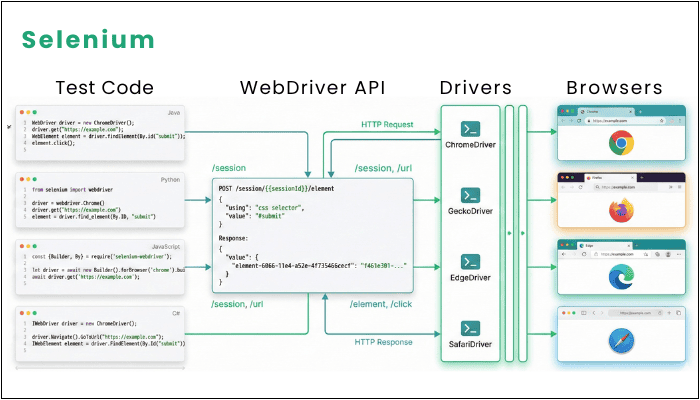
Selenium has a layered architecture where your test code sends commands to language-specific bindings. Those bindings serialize your commands and send them over HTTP to browser-specific drivers. Now each driver translates WebDriver commands into the native protocol the browser understands, which ultimately provides you the flexibility to build the framework you need.
Other Notable Features of Selenium
- Open-Source Tool: One of the biggest perks of Selenium is its open-source nature, where you don’t need to bear any licensing costs.
- True Cross-Browser Testing: You control actual browsers on real operating systems, so your test results reflect actual user experiences, not simulated behavior in a synthetic environment.
- Long-Term Viability: With governance under the OpenJS Foundation and contributions from major browser vendors themselves, you don't face abandonment risk. Selenium's going to be around for decades.
- Hiring and Expertise: Selenium expertise is broadly available in the market. Finding engineers experienced in building production-grade Selenium frameworks is vastly easier than finding specialists in niche commercial tools.
Concerns You Should Consider
- Framework Engineering Burden: Building a production-grade automation framework requires 3-6 months of dedicated engineering before it's ready for significant test development.
- Flakiness Trap: Many organizations abandon Selenium after initial negative experiences with flaky tests, without realizing the instability resulted from poor framework design, not from Selenium itself.
- No Built-In Reporting or Analytics: Selenium produces pass/fail results. You need to build and maintain dashboards, trend analysis, flake detection, and requirement traceability.
- Maintenance Overhead at Scale: Beyond 500-1000 tests, maintenance becomes increasingly problematic.
Pricing
Even though Selenium is an open-source tool, you still need to spend on resources, infrastructure, maintenance, and optional services.
- Engineering Resources: Building a production-grade framework requires 6-12 months of full-time QA engineering effort.
- Infrastructure: Running Selenium Grid at scale requires cloud infrastructure. Annual costs for a medium-sized program range from $20,000 to $100,000+, depending on parallel execution requirements.
- Ongoing Maintenance: Budget 20-30% of your QA capacity for framework adjustments and test updates
- Optional Cloud Grid Services: BrowserStack, Sauce Labs, or similar services add $400-$2,000+ annually for cross-browser testing needs.
When Selenium Makes Sense for Your Organization
Choose Selenium when:
- Your organization has a strong QA engineering capability and can invest in framework development.
- Your application portfolio is predominantly custom web applications.
- You want to avoid vendor lock-in and maintain maximum flexibility.
- You're comfortable with technical hiring and can build internal expertise.
- Your testing needs are sophisticated and benefit from customization.
Must Read: Playwright vs Selenium
10. Playwright
When you talk about Playwright, you’re looking at a modern alternative to Selenium developed by Microsoft with a fundamentally different architecture. Rather than communicating through browser-specific driver binaries, Playwright communicates directly with browser internals over its own protocol. The architectural difference has profound implications for what Playwright can offer.
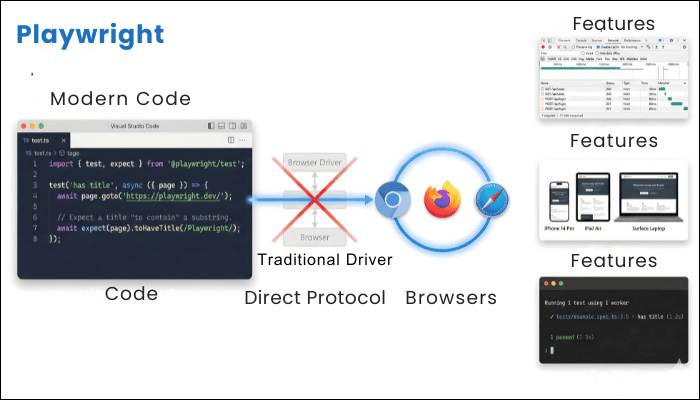
Playwright supports Chromium, Firefox, and WebKit. You can write your test against one browser, and it will work identically against the other two as well, without any modification. Additionally, this automated testing tool supports enterprise app bindings for JavaScript/TypeScript, Python, Java, and .NET. Your tests can live in the same TypeScript codebase as your application code, follow the same linting rules, and integrate with the same CI/CD practices.
Other Notable Features of Playwright
- Auto-Waiting: Before interacting with elements, Playwright automatically waits for them to be actionable, eliminating the entire category of element not clickable errors.
- Network Interception: You can intercept and mock network requests, simulating API failures without breaking your backend, testing resilience to slow networks, or validating that specific API calls occur during user workflows.
- Device Emulation: Using this tool, you can emulate mobile devices and various screen sizes without requiring actual devices.
- Built-In Test Runner: Playwright Test includes parallel execution, sharding, retries, and reporting out of the box.
Also Read: Playwright features
Concerns You Should Consider
- Web-Only Focus: Playwright cannot automate packaged enterprise applications, native desktop apps, or thick-client UIs. Playwright won’t help if your enterprise relies on SAP GUI or Oracle Forms.
- Single-Page Application Bias: Playwright excels at modern SPAs but is less suited to heavy multi-page applications with traditional form-based navigation.
- Limited Mobile Device Coverage: Device emulation helps with responsive design testing, but doesn't replace real device testing.
Why Playwright Makes Sense for Your Organization
Playwright should be part of your tool stack when:
- Your primary applications are modern web applications built with current JavaScript frameworks.
- Your team includes developers comfortable reading and writing JavaScript/TypeScript.
- You want a newer automation architecture without the Selenium learning curve.
- You can accept a smaller ecosystem in exchange for better tooling.
- You're building new test automation programs rather than maintaining legacy Selenium suites.
How You Should Choose the Right Tools
Rather than declaring one tool superior, here's how you should approach this decision:
- Map Your Application Portfolio
You need to begin the selection process by creating a selection matrix where:- X-Axis: Technology Type
- Y-Axis: Strategic Importance
Creating this matrix will reveal where you need specialized tools versus where commodity tools suffice.
- Assess Your QA Team's Skills
The next step you need to take is to evaluate the skillset of your existing team. Whether they are skilled in Selenium or Playwright frameworks, and their overall expertise. Selecting a tool exceeding your team's capability creates implementation failure faster than selecting a tool with fewer features but better team fit. - Evaluate Your Investment Capacity
When it comes to the overall budget allocation for tools, you don’t just need to consider tool license cost, but also other expenses such as infrastructure, engineering, maintenance, and personnel costs. For instance, Selenium is an open-source tool, but it requires 6-12 months for engineering, along with moderate ongoing maintenance. On the other hand, ACCELQ has licensing costs, but its self-healing features reduce ongoing maintenance costs. - Understand Your Release Cadence
Tools shine in different release contexts:- Frequent Releases: Need low-maintenance tools like Playwright or ACCELQ.
- Quarterly Releases: Tosca's risk-based optimization becomes valuable.
- Upgrade-Driven: Panaya's change intelligence shines.
Your release pattern directly influences which tool architecture fits best.
- Run Pilots before Committing
Before making any long-term commitment, it's best to run a small pilot with a real enterprise application. Make sure to automate at least 25-50 scenarios over a few weeks and observe how the tool behaves as changes occur. Doing so will reveal whether your team can use it comfortably and how much maintenance it needs.
Conclusion
Enterprise test automation tool selection is about the trade-offs, not finding the universally superior solution. Selenium offers flexibility but demands engineering investment, whereas commercial tools offer faster starts but reduced customization. The organizations that excel at test automation aren't those that found the perfect tool. They're the ones that:
- Understand their actual testing requirements beyond marketing narratives.
- Honestly assess their team's capabilities and invest in development accordingly.
- Deploy appropriate tools for different applications rather than forcing uniformity.
- Invest in governance and standards so multiple tools coexist coherently.
- Continuously evolve as both tools and organizational needs change.
Without a doubt, the tools you choose matter as they shape what’s automatable and at what cost. But tool selection is an enabling decision, not a strategic one. Strategy is about which business processes deserve testing investment, and how testing supports faster software delivery. Once you have that strategy clear, tool selection becomes a straightforward exercise of matching tools to strategy.
You can use this guide not as a decree of which tool to pick, but as a framework for understanding what each tool offers, its strengths and weaknesses, and how it might or might not fit your specific enterprise context.
Even with the right tools selected, the gap between choosing and implementing remains substantial.
If you want to build comprehensive test automation for enterprise applications, and you want to avoid the common pitfalls that derail automation programs, professional automation testing services by ThinkSys can help you move from tool selection and evaluation to actual, sustainable implementation.
From faster deliveries to automation expertise, ThinkSys can deliver all to make your enterprise software testing seamless. Reach out to our experts to begin your automation testing journey today.
Frequently Asked Questions (FAQs)
- Poor tool selection
- Unrealistic expectations
- Lack of a test data strategy
- Ignoring maintenance costs
- Treating automation as a side activity
Share This Article:
 Previous Post