
Free Webinar, Oct 27Stop your AI agents from writing flaky playwright tests.
Free Webinar, Oct 27Stop your AI agents from writing flaky playwright tests.
Your Android app doesn't fail in a lab. It fails on a three-year-old Samsung with an aggressive battery saver, on a Xiaomi that kills background services its own way, or on a flaky 4G connection in a parking garage. We test it there.
ThinkSys runs Android app testing on real devices across the OEMs your users actually own, then holds your crash and ANR rates under the thresholds Google Play uses to decide whether your app gets promoted or buried. The result is fewer production surprises, cleaner releases, and a store listing that isn't quietly penalized for instability.
In short: Android app testing services validate how your app behaves across real devices, OS versions, and networks before release. ThinkSys tests on physical Samsung, Google Pixel, OnePlus, Xiaomi, and Motorola devices running Android 10-15, targets Google Play's Android Vitals thresholds (crash rate under 1.09%, ANR rate under 0.47%), and takes ownership of release sign-off, not just test execution.
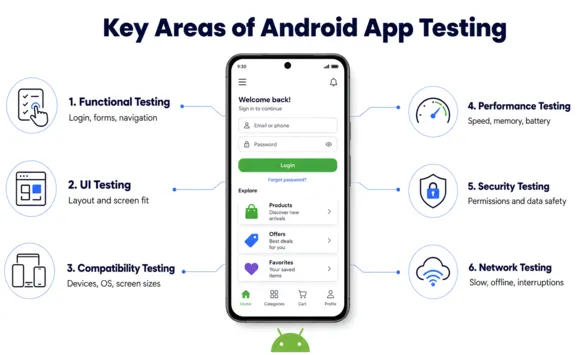
Most Android bugs that reach users were never visible to the team that shipped them. They don't show up in the emulator because the emulator doesn't have a real battery, a real modem, or a manufacturer's custom version of Android deciding to kill your background work.
Three things cause the majority of Android production issues, and none of them reproduce reliably in a virtual device:
When these slip through, the cost isn't abstract. It's one-star reviews, rising uninstalls, and the part teams miss, a Play Store algorithm that demotes unstable apps. Which is exactly where our approach starts.
This is the part generic testing skips. Google Play doesn't just host your app, it ranks it, and instability drops your ranking and visibility.
Google measures two numbers through Android Vitals and treats them as "bad behavior" thresholds:
| Metric | Overall threshold | Per-device threshold | What happens if you exceed it |
| Crash rate (user-perceived) | above 1.09% | above 8% on any single device model | Play may reduce your store visibility and show a warning on your listing |
| ANR rate (App Not Responding) | above 0.47% | above 8% on any single device model | Same, reduced visibility, possible listing warning |
We test specifically to keep you under those lines. That means chasing down the ANRs caused by main-thread work, the crashes that only appear on certain chipsets, and the memory leaks that surface after twenty minutes of use, the failures Android Vitals will punish you for.
Beyond Vitals, our Play-readiness checks cover the things that get releases rejected or delisted:
No other testing provider frames Android work this way, because most treat Android as "the other half of mobile." It isn't. It's a different platform with a different store, different rules, and different failure modes.
We test on physical Android hardware, not just cloud emulation. Our coverage spans Android 10 through Android 15 across the OEMs that dominate real usage: Samsung (One UI), Google Pixel, OnePlus (OxygenOS), Xiaomi (MIUI), Motorola, and Oppo.
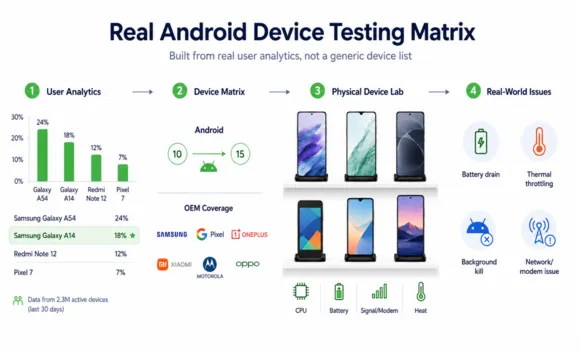
Why real devices earn their cost:
We choose the device matrix from your analytics, not a generic list. If 40% of your users are on mid-range Samsung devices two OS versions back, that's where we concentrate, because that's where your risk actually lives. Our Android device matrix combines an in-house lab of physical devices with cloud device farms, giving us access to 100+ real Android devices across Samsung, Pixel, OnePlus, Xiaomi, Motorola, and Oppo, from current flagships to the three-year-old mid-range models where most crashes actually happen. We build your specific matrix from your user analytics, not a default list.
Also Read: Complete checklist for android app testing
Automation is how you keep a growing app stable without slowing releases, but only if the suite is reliable. A flaky automated test that fails at random is worse than no test, because teams learn to ignore it.
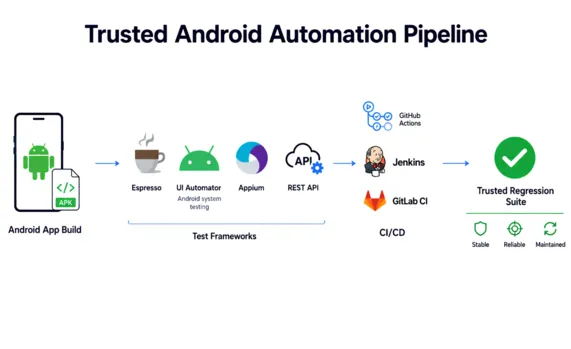
We build Android automation with maintainability as the point, not test count:
The goal is a regression suite your engineers actually trust, one that catches real breakage early and stays green when nothing's wrong.
Security problems in Android apps tend to surface after release, when they're expensive and public. We look for them before, focusing on how your app handles data, permissions, and authentication on real devices.
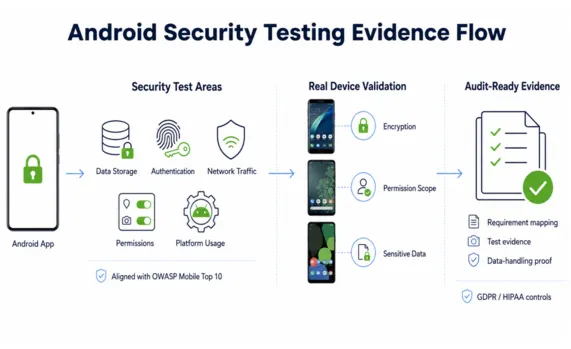
Our security testing is aligned to the OWASP Mobile Top 10 - insecure data storage, weak authentication, insecure communication, improper platform usage, and, where it applies, we validate the controls behind GDPR and HIPAA obligations: encryption at rest and in transit, permission scope, and safe handling of sensitive data. For regulated apps, we produce the evidence your auditors expect, not just a pass/fail. Every regulated engagement includes audit-ready deliverables: test evidence mapped to requirements, data-handling verification, and documentation your compliance team can hand to an auditor.
Every testing type below maps to a specific way apps fail in production:
| Testing type | What it catches | Why it matters |
| Functional & regression | Broken flows and features that regress after a change | Users can complete core actions; yesterday's fix doesn't break today |
| Performance & load | Slow screens, memory leaks, battery drain, crashes under load | Protects retention and keeps you under Android Vitals thresholds |
| Compatibility & installation | Install/upgrade failures, OS-version incompatibilities | Prevents update failures and store rejections |
| Network & 5G | Failures on weak, changing, or high-speed connections | Consistent behavior wherever users actually are |
| Usability & accessibility | Confusing flows, accessibility barriers | Fewer bad reviews, wider reach |
| API testing | Bad data and integration failures between app and backend | Stops crashes and data corruption at the source |
We run these as a deliberate mix of manual and automated work, manual for judgment, edge cases, and real user behavior; automation for the repetitive regression checks that need to run on every build.
You don't have to sign a long contract to find out whether we're any good. We start small and let the results decide.
We focus on Android apps where a failure has real consequences:
Case study: US FinTech app crash rate cut by two-thirds in one quarter.
A US payments app was exceeding Google Play's crash-rate threshold on mid-range Samsung devices, hurting store visibility. We rebuilt the device matrix from their user analytics, reproduced the top crashes on physical devices, and prioritized fixes by affected-user count. Within 12 weeks, the user-perceived crash rate fell from 2.1% to 0.6%, well under Play's 1.09% line, and their Play Store rating rose from 3.9 to 4.5.
Android isn't the second half of "mobile." It's a different platform with its own store rules, its own failure modes, and its own ranking penalties for instability. We test your app where it actually runs on real devices, real networks, real OEM quirks, and we hold it to the standard Google Play actually enforces. That's how you ship an Android app that stays stable, stays visible, and stays out of the one-star reviews.

About the Author
Sumukhi Sharma
Expertise in End-to-End Manual Testing, Quality Assurance Strategy, Cross-Functional Team Management, and Agile Scrum Practices with 10+ Years of Experience Delivering High-Quality Software Solutions Across Diverse Domains.


