Retail App Testing Best Practices for Reliable Shopping Experiences
Retail App Testing Best Practices for Reliable Shopping Experiences
Retail app failures are not technical issues, they are direct revenue losses. A slow checkout, failed payment, or inventory mismatch doesn’t just frustrate users; it immediately impacts conversion, customer retention, and brand trust.
Who This Guide Is For
- CTOs and Engineering Leaders managing high-scale retail platforms
- QA Directors responsible for release quality and stability
- Product teams handling high-conversion checkout and payment flows
- Teams preparing for high-traffic events like sales, launches, or seasonal spikes

Why Retail Apps Need Specialized Testing
When you ship a retail app, you open your primary storefront on your customer’s smartphone. With mobile now driving around 57% global ecommerce sales and over half of mobile commerce happening through apps, your retail app often becomes the primary and often the only touchpoint a shopper has with your brand. That makes specialized testing non-negotiable.
Black Friday and Cyber Monday are among the most revenue-generating days of the year, and crashes on those days mean goodbye to profits. Shopify alone processed $9.3 billion during BFCM, with traffic peaking at nearly 1 million requests per second. Any instability at the scale directly results in lost orders. At the same time, global cart abandonment hovers around 70%, and crashes or slow checkouts are known to be the key reasons shoppers walk away. Due to all these reasons, a poor mobile experience is estimated to cost U.S. retailers $ 24 billion annually.
The worst part: you’re not just losing customers, you’re losing them to your rivals. One study found that 81% of smartphone shoppers switch to a competitor if they experience any performance issues. So, if a customer goes to a competitor, there is almost no chance they'll come back.
Your app store rating amplifies this effect as over 90% of users check ratings before installing, and apps with high ratings can see up to 3X more downloads. With that in mind, your customers may never download your app if the ratings are too low. Considering that fact, retail-specific testing is the difference between a loyal customer base and a leaky funnel that funds your competitors.
Key Challenges Retail Apps Face
Testing a retail application involves considering various factors that can affect its performance and stability. These challenges, directly or indirectly, make testing tedious and require modifications to your testing strategy. If you want your retail app testing strategy to provide tangible results, make sure to tackle the following challenges:
Heavy Seasonal Traffic Spikes
Whether it’s a sale or a new product launch, your retail app needs to handle a large number of users simultaneously at times. Online shoppers have little patience for retail applications. Once they witness a single crash or error, they’ll immediately go to your competitors, either right away or for the next sale. One thing is sure: they will not return. This means you can’t rely on average-load testing. You need peak-aware performance testing, chaos scenario, and capacity planning that simulate flash sales, promo drops, and push notification surges.
Multiple Payment Integrations
One of the primary reasons for cart abandonment is limited payment options. Some users prefer to pay through debit or credit cards, while others prefer PayPal or other wallets. To meet their needs, you need to integrate multiple payment methods, which increases complexity. Your test strategy must treat payments as a high-risk ecosystem, validating each payment service provider, wallet, and buy-now-pay-later flow end-to-end, including retries, timeouts, and graceful degradation when a route fails.
Device and OS Fragmentation
Android alone spans over 24,000 distinct devices globally, and about 70% of users still run older OS versions. Pair that with various iPhone generations, iPads, and tablets, and you have thousands of devices and dozens of operating systems to test for a single app version. Undeniably, you cannot test everything, so you need a data-driven matrix that prioritizes real user devices and OS mixes, combining cloud device farms with targeted testing on low-end and regional models that often expose performance and layout issues.
Frequent UI and Content Updates
Retail applications change more in a week than classic software does in a quarter, with continuous promotions, experiments, and UI tweaks driving constant change. As a result, you need to design a testing strategy anchored in stable identifiers, resilient locators, and UI regression suites so that small copy or layout changes don’t silently break your core journeys.
Inventory and Pricing Sync Issues
When inventory fails to sync across channels, you either oversell or suffer phantom stockouts. To tackle that effectively, you need to integrate tests and synthetic orders that validate reservation logic, sync latency, and reconciliations across channels, plus negative scenarios where APIs are throttled or partially down.
Security Risks
North American ecommerce and retail reported fraud losses, with mobile and digital transactions accounting for up to 41% of fraud costs in some markets, and 64% of merchants say fraud directly hurts conversion rates. Whenever a customer uses our application, they provide access to their data. Not having a secure app not only hampers trust but also invites regulatory penalties and legal fees. Protecting your retail application from fraud should involve 3DS flows, device fingerprinting, step-up authentication, and abuse scenarios so that anti-fraud controls don’t block legitimate buyers or degrade the experience. Performing threat modeling is another crucial step.
Omnichannel Experiences
Research shows that up to 85% of shoppers prefer using both physical and digital channels, expecting to seamlessly pick up their journey across them. That means you must test cross-channel flows, including apps, website, and in-store interactions, end-to-end using test data and environments that mirror real-world fulfilment, and loyalty, not just isolated app screens.
Even well-architected retail systems can fail under real-world peak conditions.
Real-World Failure Scenario:
During a major festive sale, a retail platform experienced a 18–25% drop in checkout success rate within the first hour of peak traffic.
Root cause analysis revealed:
- Inventory locking failure under concurrent requests
- Delayed payment gateway callbacks
- Retry storms overwhelming backend services
The result was not just immediate revenue loss but also long-term customer churn and support overhead.
These are the exact scenarios that a robust retail testing strategy is designed to prevent.
End-to-End Testing Strategy
Performing random tests at different stages is just a disaster waiting to happen. But if you treat it as a layered defense system, you start preventing such disasters. An effective E2E testing strategy is not about running more tests, but testing them in a way that mirrors how your revenue flows.
Imagine a customer opening your app during a flash sale. They browse, apply a coupon, choose a credit card, complete payment, and expect instant confirmation. Behind that seemingly simple journey, there is a chain of systems and notification services. Your goal is to implement a testing strategy that validates the entire chain as a continuous experience.
Here’s how your testing structure should look.
Testing Layers in Retail Application
- Unit Testing; The first part of your layered testing is performing unit testing on your app. Unit testing involves breaking down the application into different units and testing them in isolation. Performing unit testing will give you an overview of whether a specific feature has any bugs or issues that need fixing. These units are tested independently using controlled inputs and expected outputs.
In most cases, unit testing will be done by developers, but they can also let the QA team focus on this testing. By performing unit testing, you can detect bugs early, reduce the need for regression testing, and improve code quality. - API Testing: Your retail app requires APIs for payment, inventory management, customer relationship management, order management, and more. API testing ensures that request-response contracts between services function as anticipated. Your goal is to test authentication tokens, retry mechanisms, data schema correctness, timeout behavior, error handling flows, and idempotency. In API testing, you need to remember that negative scenarios are more important than happy paths, so you need to test both success and failure paths.
- Integration Testing: While API testing focuses on individual service interactions, integration testing examines how multiple services collaborate within a workflow. It verifies that all the actions in a workflow occur in a synchronized sequence.
If two customers attempt to purchase the last available unit simultaneously, the system must resolve concurrency without overselling. Integration testing evaluates how systems behave when data flows across layers. By ensuring that distributed components behave as a unique commerce engine rather than fragmented subsystems, integration testing safeguards transactional consistency across your entire retail ecosystem. - UI Testing: Your retail app’s interface is the conversion gateway, and any UI defect masquerades as a business failure. A misplaced Apply Coupon field or an invisible checkout button at certain screen sizes reduces conversion without generating backend errors. To check all such cosmetic yet powerful features, you need UI testing. Here, you’ll test to ensure that visual components render correctly across devices, buttons trigger the intended actions, forms validate input accurately, and dynamic content loads without distortion.
- Performance Testing: Traffic in retail apps may sometimes behave unpredictably. While you might prepare for flash sales or discounts, you cannot prepare for random traffic spikes. Performance testing measures how quickly your app responds under normal conditions, while load testing evaluates how it behaves under heavy load.
- Security Testing: When people use your app, they’re trusting you with their financial and personal data. And it’s your responsibility to protect the data of millions of your users. Failing to protect data not only attracts hefty regulatory fines but also permanently erodes customer trust. Your enemies are not just hackers but also people who abuse coupons, use automated bots for purchases, and exploit promotions.
With that in mind, security testing involves identifying vulnerabilities in authentication flows, API access controls, encryption practices, and data storage mechanisms, and conducting vulnerability assessments and fraud simulations. It ensures that business rules cannot be manipulated by unexpected inputs or automated systems. - UAT and Production Monitoring: User Acceptance Testing represents the final commercial validation before release. Production monitoring acts as an extension of the testing strategy. It tracks real-time metrics including checkout success rate, payment failure frequency, crash analytics, API latency, and conversion trends.
Monitoring closes the loop between pre-release validation and real-world performance. Moreover, it ensures that even unforeseen scenarios are detected early and corrected before revenue erosion becomes visible.
User Acceptance Testing represents the final commercial validation before release. It confirms that promotional logic, pricing thresholds, tax calculations, localization, and campaign mechanics align with business expectations. This is where technical execution meets marketing intent.
Retail App Testing Best Practices
When it comes to giving the best shopping experience to your users, you need to thoroughly test your retail application. As seen in real-world scenarios where checkout failures and inventory mismatches occur during peak traffic, even minor issues can cascade into large-scale revenue-impacting failures.
The following are the top practices you need to incorporate into your existing test strategy to deliver a seamless, bug-free experience.
Test Critical Journeys First
As people visiting retail apps are there to buy products, these apps are not feature-driven but conversion-driven. Not every feature contributes equally to revenue, and not every defect carries the same commercial risk. Considering that, testing critical shopping journeys first means prioritizing validation of the flows that directly generate revenue over secondary or cosmetic functionality.
When you study your retail app, you understand that users rarely explore randomly. Their behavior follows a predictable commerce pattern: they open the app to browse, search, compare, add items to the cart, apply offers, select payment methods, and complete payments. These high-intent journeys form the fundamentals of your revenue funnel. Testing critical shopping journeys first means identifying these high-impact workflows and validating them comprehensively before investing effort in edge features or low-frequency flows.
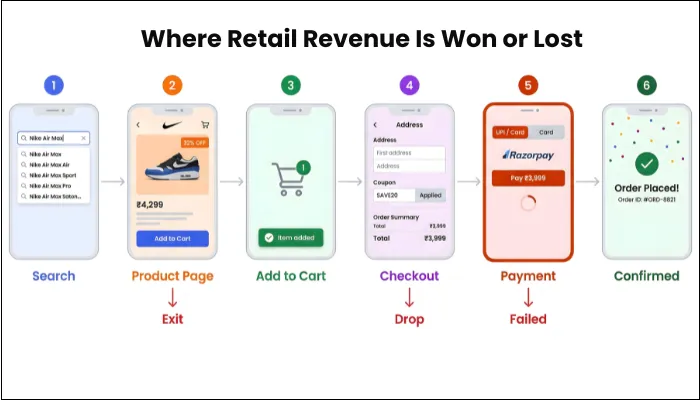
In production, failures in these journeys directly translate to revenue loss, increased cart abandonment, and reduced conversion rates.
What Are the Critical Shopping Journeys in Retail Apps
Some customer actions indicate their intent to buy the product. For instance, a person heading from the home page to the clothing page might be there just to learn about the latest fashion trends. However, if a person goes to the search bar and looks for a specific product, there is a good chance they’ve already made up their mind to buy it and are likely to make the purchase.
This is one major example of a critical user journey. In simpler terms, critical journeys are those that directly influence conversion, payment completion, and post-purchase satisfaction. For retail apps, these include:
- Product Search: Search is often the highest-intent entry point in a retail app. You need to validate keyword matching, typo tolerance, auto-suggestions, filter logic, and result ranking accuracy. If search relevance is poor or slow, users will never hesitate to exit.
- Product Page: The product detail page converts curiosity into intent. You must verify pricing accuracy, discount visibility, stock status, variant selection, image loading, and delivery estimates.
- Add to Cart: Though the action seems simple, it involves inventory validation, cart state persistence, real-time price recalculation, and promotional eligibility checks. You need to ensure that cart updates are immediate and consistent across sessions and devices.
- Checkout: Probably one of the most crucial steps for securing revenue, the checkout consolidates user information, and you need to validate dynamic recalculations when users modify addresses, quantities, or payment methods.
- Payment: The most fragile stage in the journey. You must test gateway redirections, token handling, timeout scenarios, duplicate submission prevention, and success/failure callbacks.
- Order Confirmation: Once payment is done, the customer must receive an order confirmation to validate the transaction. A missing confirmation after payment creates panic and escalates support, so you need to ensure the generation of order IDs, the immediate inventory update, and the triggering of confirmation notifications to avoid panic among buyers.
How to Implement This Strategically
You begin by mapping your revenue funnel with precision, avoiding assumptions. Before prioritizing journeys, you need to identify your top-selling categories, the most-used payment methods, and the user paths that drive the highest conversion. Review analytics to identify the areas or stages where users abandon carts, exit during checkout, close the page quickly, and fail at payment.
From this data, you can build a prioritized test matrix ranked by business impact rather than feature count. Every critical journey should be automated to ensure regression stability. Most importantly, establish a release gate. High-performing retail teams treat testing as a mandatory release checkpoint, ensuring that no build goes live without validating revenue-critical journeys.
Focus on Checkout Stability
No matter how good your product page is or how smooth your app is, if it crashes during the payment page, the user will never convert into a customer. Even though it’s among the latter stages of buying, you should never leave checkout page testing for the last.
Focusing on checkout stability means designing your testing strategy around ensuring that the checkout flow behaves predictably, consistently, and resiliently under all conditions.
What Checkout Stability Means
Checkout stability is not limited to making the payment work; it also involves several other actions. In other words, it is the assurance that every component involved in the transaction behaves reliably. These include:
- The cart total must be calculated correctly.
- Discounts must apply precisely as configured.
- Shipping charges must adjust dynamically.
- Taxes must reflect accurate jurisdiction rules.
- Address validation must not block legitimate entries.
- Payment redirection must complete without session loss.
- The order confirmation must be generated immediately after payment is successful.
A stable checkout process means either the transaction completes fully, or it fails gracefully without charging the customer or corrupting order data.
What Must Be Tested for Checkout Stability
To truly focus on checkout stability, you must validate multiple dimensions simultaneously.
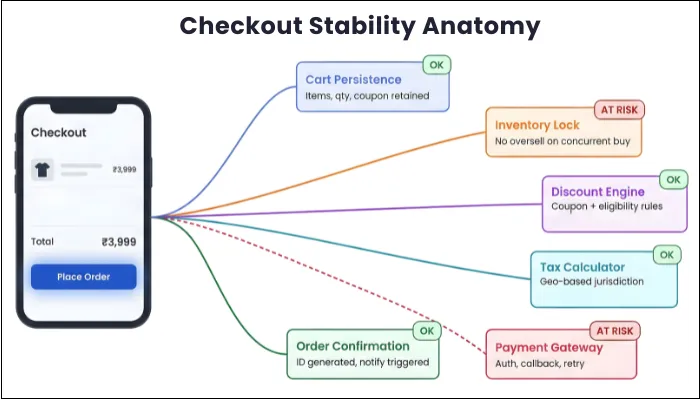
- Cart Persistence: While making a payment, you users may have to switch screens to retrieve OTPs, or respond to notifications. You need to consider all such scenarios while testing and ensure that the cart items, quantities, applied coupons, selected addresses, and chosen payment methods remain intact. While testing, keep in mind that the cart state should be restored from backend services, not solely from local storage.
- Inventory Reservation and Concurrency: Retail apps frequently handle limited stock during high-demand events. Simulate multiple simultaneous checkout attempts for the same SKU. Validate inventory locking or reservation logic at the database level and confirm that only available units are sold and that out-of-stock messaging is accurate.
- Discounts and Taxes: One of the biggest reasons people shop online is the huge discounts offered. The discounts you offer depend on thresholds, SKU eligibility, stacking rules, and time windows. In addition, you need to calculate taxes that vary by geography and product type. You need to begin with unit-level validation of pricing functions using boundary-value testing and validate thresholds just below and above eligibility limits. Then simulate real checkout interactions, such as modifying quantities mid-flow, removing items that affect discount eligibility, and changing delivery addresses to trigger tax recalculation.
- Payment Authorization and Retries: Mobile payment flows are inherently unstable due to network latency and gateway delays. Your testing must reflect that reality. From simulating gateway timeouts after authorization to triggering rapid retry attempts, you need to do it all to ensure each payment method results in successful order placement.
In production environments, checkout instability is one of the fastest ways to lose customers, as even a single failed transaction can permanently impact user trust and lifetime value.
Ensure Cross-Device Compatibility
With Android and iOS devices constantly competing for the top spot, testers' responsibility is to ensure that every device delivers the same experience to users. You need to conduct market research to understand the distribution of iOS, Android, and tablet users for your retail app.
Retail traffic often skews toward mid-range and budget devices, especially in emerging markets. If your QA process validates only flagship devices, you may unintentionally exclude a large portion of your customer base. Operating systems evolve rapidly. A minor OS update can introduce rendering inconsistencies, permission changes, or restrictions on background activity, which can affect cart persistence and payment flows. So, you need to test various combinations of devices and OS.
How to Implement Cross-Platform Compatibility Testing
Your user persona consists of iOS and Android smartphones and tablets. So your testing strategy should consider every aspect of devices, be it hardware or software.
Your first action should be to understand your audience and prioritize devices: By using app analytics, you need to identify:
- Most-used device models
- OS version distribution
- Screen resolution trends
- High-traffic geographies
Based on the data received, you can build a device coverage matrix.
As there are thousands of device models, testing your app on them physically is neither feasible nor practical. Rather, you can use a blend of real + cloud-based devices through emulators. On such devices, you need to test every functional and non-functional feature and ensure they function correctly across all devices.
Validate Payment Gateway Reliability
Payment gateway validation is not limited to confirming that money moves from the customer to your account. It’s more about ensuring that every payment method behaves predictably across authorization, capture, settlement, and refund scenarios in case anything goes south.
As there are various payment types, your retail app payment testing should involve testing each type independently. The commonest payment methods are cards, wallets (PayPal or Apple Pay), BNPL, and international payments. s
- Card Payments: When users make a card payment, each payment requires validation of 3D Secure flows, tokenization, and the timing of charge capture. For that, you need to simulate authorization success with delayed confirmation callbacks and validate idempotency to prevent duplicate charges during retries. To ensure that only valid transactions go through, you need to test for expired cards, insufficient funds, incorrect CVV, or incorrect card details.
- Wallet Payments: Wallet payments are more about redirection and deep-link callbacks. Testing this payment method includes switching during authentication, session persistence, and failure handling when the walled app is unavailable or the network drops mid-transaction.
- BNPL: It’s projected that BNPL transactions will reach nearly $700 million by 2028. With that in mind, you need to ensure that your app supports BNPL to capture potential buyers. As BNPL involves eligibility checks, credit-scoring APIs, installment-plan calculations, and third-party approval logic, its flows are a bit complex. You need to test scenarios where users fail eligibility. Furthermore, make sure to validate the accuracy of installment breakdowns, interest calculations, and the impact of order cancellations on repayment schedules.
- International Payments: If your app caters to international users, you need to support multi-currency conversion, foreign-transaction validation, cross-border tax calculation, and the current exchange rate. While testing, ensure that the currency displayed at checkout matches the settlement records.
- Refunds: Sometimes, users want to return the products they bought or cancel an existing order. In that case, you need to refund the received money to their preferred payment method. Initially, you test full refunds to the source, and move towards partial refunds, wallet credit, and automatic refunds triggered by failed order creation. Efficient refund testing involves implementing sandbox simulations, negative testing for timeout scenarios, webhook validation, and transaction log audits.
Handle High Traffic Events
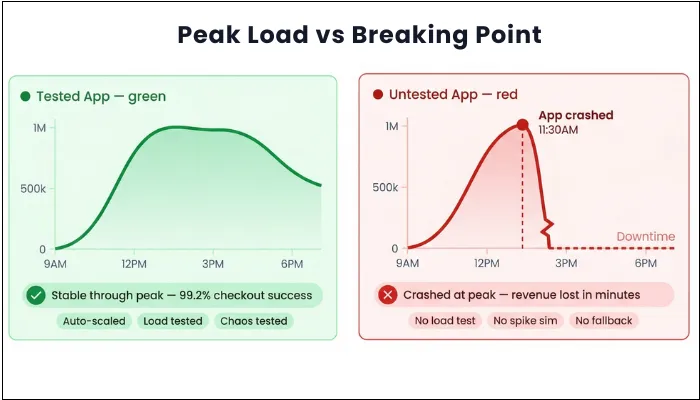
Black Friday sales, new product launches, stock-clearance sales, and the festive season all have one thing in common: increased application traffic. Every such campaign does not simply increase load; it changes traffic patterns. Users browse aggressively and race to capture the limited stock. And if your testing does not reflect this behavior, your app will crash at the moment that matters most.
The first step to ensure your retail app remains stable during high-traffic events is to build realistic traffic models. Calculate peak concurrent users, add-to-cart frequency, and checkout attempts per minute from past campaigns. Feed these numbers into load-testing tools and simulate full user journeys.
Next, isolate high-risk services. Stress-test inventory reservation under concurrent purchase attempts for the same SKU and observe database locking behavior. While doing so, don’t forget to capture response-time percentiles, thread-pool saturation, cache-eviction rates, and queue buildup.
Introduce spike testing to simulate sudden surges rather than gradual ramp-ups. Many systems pass ramp tests but fail during abrupt bursts. To ensure your app doesn’t fail, validate auto-scaling rules by forcing load beyond expected thresholds and confirming that new instances launch quickly.
Most retail platforms do not fail under normal load; they fail under peak conditions where real user behavior deviates from controlled test environments.
Test Inventory and Pricing Sync
Inventory and pricing sync is often the most common cause of frustration among users. Not only do they damage trust, but they also force customers to switch to the competition. In the majority of cases, retail apps pull data from separate inventory, pricing, and promotion engines. With that in mind, your aim is to validate that these systems remain consistent under concurrent load and varying latency.
- Inventory Accuracy: Testing inventory accuracy should be a top priority in your testing strategy. To test this, you need to simulate multiple users attempting to purchase the last available unit and verify that atomic reservation logic prevents overselling. By introducing artificial delays between the reservation and payment confirmation, you confirm that the stock is either correctly locked or released after the timeout.
- Pricing Validation: Another major problem is incorrect pricing on the product page and the final payment age. Pricing validation maintains product pricing consistency and requires cross-layer verification. You need to compare database price values, API responses, UI display, and final invoice amounts, and ensure that price consistency across all. Test price updates during active sessions to confirm whether business rules lock pricing or force recalculation. To test fallback failures, you need to inject failures between the pricing and checkout services.
Inventory inconsistencies not only lead to order failures but also erode customer trust, which is significantly harder to recover than immediate revenue loss.
Optimizing App Performance
Not many people realize this, but even a single second delay in launching or opening a feature can ruin the entire user experience. It directly influences conversion, retention, and revenue. From app launch to order confirmation, optimizing performance means ensuring responsiveness throughout the user journey. The following are the top areas you need to focus on:
1. App Startup Time: The first few seconds shape the perception. You need to measure your app’s cold start time on low and mid-range devices, not just flagship phones. By using profiling tools, you can identify blocking API calls, heavy SDK initializations, and oversized assets loaded at launch. You need to understand one principle that your app should load only what the user needs immediately.
2. Page Loading Speed: The next most significant area of your app is the product pages. Page loading speed depends on both backend efficiency and client optimization. With practices like lazy loading and dynamic caching, you can reduce page loading speed.
3. Search Speed: Search must feel instant to the users. You need to implement search APIs and measure response times under a realistic load. In addition, cache popular queries intelligently and test how gracefully loading states appear under low network conditions.
4. Checkout Speed: Checkout performance deserves its own scrutiny. Cart recalculation time, tax computation latency, and payment authorization delays under concurrent load are the areas you should focus on to improve your app's checkout speed.
Automate Regression Testing
As retail apps are released frequently and operate in tightly coupled ecosystems, even a minor modification can unintentionally introduce issues and disrupt many core functionalities. Regression testing is the disciplined process of revalidating previously working commerce flows after every change.
Combine regression with automated scripts, and you can continuously validate high-impact workflows such as browse-to-cart transitions, dynamic price recalculation, coupon stacking logic, payment success callbacks, refund processing, and order history updates. These scripts run automatically within your CI/CD pipeline, ensuring that each build proves its commercial stability before deployment.
Automated regression testing enables faster release cycles without compromising revenue-critical stability, reduces dependency on repetitive manual validation, and provides measurable confidence that your core commerce engine remains intact despite rapid iteration.
Test Omnichannel Experiences
Mobile shopping no longer operates within a single touchpoint. Your customers may discover a product offline, compare it on a desktop, and complete the purchase through your app. All that interconnectedness defines Omnichannel retail, where all the core actions should remain in sync across all channels.
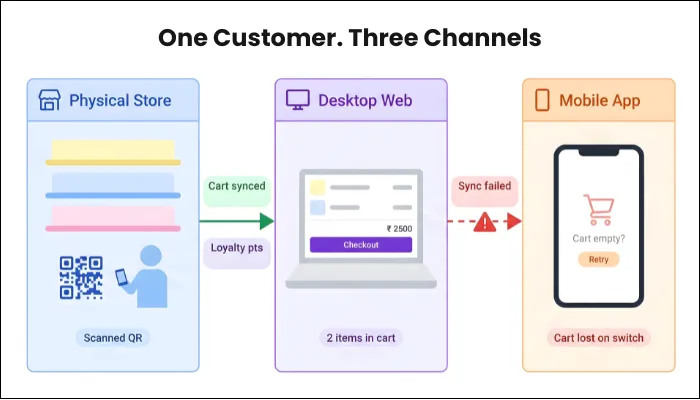
Testing Omnichannel experiences means ensuring that this synchronization works effectively. Your testing should verify that a cart created on mobile reflects accurately on the web, that in-store pickup options display accurate real-time inventory, loyalty points earned are updated in the app, and more.
You test these experiences by simulating cross-channel journeys rather than isolated app flows, deliberately switching devices mid-transaction, altering fulfillment methods, and validating data propagation under varying network conditions. With a seamless omnichannel app, your retail ecosystem behaves as a unified commerce platform rather than a collection of disconnected systems.
At scale, retail application testing is not just about functionality—it is about protecting revenue, ensuring customer trust, and enabling confident, high-frequency releases.
Types of Testing Required for Retail Apps
Retail applications have a lot of things going on simultaneously. Because of this, a single test type cannot identify every issue in the app. You need to address different layers of risk to ensure comprehensive coverage. With that in mind, the table below outlines the essential testing types required for retail apps, along with their relevant tools.
| Testing Type | What It Is | Why It Matters in Retail Apps | Common Tools | Retail-Specific Example |
| Unit Testing | At its foundation, unit testing validates individual functions or logic components in isolation before they interact with other modules. | Since pricing engines, tax rules, and discount logic directly influence revenue, even a minor miscalculation can scale into significant financial discrepancies. | JUnit, TestNG, XCTest, and Jest. | When a “Flat $20 Off Above $200” offer is introduced, unit tests confirm that eligibility thresholds and cart recalculations behave exactly as configured. |
| API Testing | API testing focuses on verifying the structured exchange of data between the retail app and its connected systems. | Given that payments, inventory updates, and shipping confirmations rely on external services, breakdowns at this layer often disrupt checkout stability. | Postman, RestAssured, and SoapUI. | A successful payment response must immediately trigger order generation and stock deduction without duplication or delay. |
| Integration Testing | Beyond isolated APIs, integration testing evaluates how multiple subsystems operate collectively within a business workflow. | Retail platforms depend on synchronized coordination between different modules, and inconsistencies here can lead to partial or failed transactions. | Karate, Cypress, and Spring Test. | During a flash sale, integration tests validate that concurrent purchases do not oversell limited inventory. |
| UI Testing | User interface testing ensures that visual components render correctly and interactive elements respond accurately across devices. | Because conversion depends heavily on frictionless interaction, layout distortions or malfunctioning buttons directly affect sales performance. | Selenium, Appium, Espresso, and XCUITest. | On both Android and iOS, the Apply Coupon function must remain visible, clickable, and responsive under various screen resolutions. |
| Performance & Load Testing | Performance testing measures responsiveness, while load testing evaluates behavior under high concurrent usage. | Traffic spikes during festive campaigns or influencer promotions can strain infrastructure, and checkout delays significantly increase abandonment. | JMeter, Gatling, k6, and LoadRunner. | Simulating thousands of simultaneous checkout attempts ensures backend systems remain stable during peak demand. |
| Security Testing | Security testing identifies vulnerabilities in authentication, encryption, and the handling of sensitive data. | Retail apps process payment credentials and personal information, making them attractive targets for fraud and exploitation. | OWASP ZAP, Burp Suite, and Nessus. | Verifying that stored card tokens are encrypted and inaccessible through client-side inspection protects customer trust. |
| Compatibility Testing | Compatibility testing confirms that the app behaves consistently across different devices, OS versions, and network conditions. | Since retail customers use diverse hardware and connectivity environments, inconsistencies can silently limit market reach. | BrowserStack, Sauce Labs, and Firebase Test Lab. | Checkout functionality is validated on mid-range Android devices running older OS versions under throttled network speeds. |
CI/CD Testing for Retail Apps
As retail apps live in a state of constant motion, frequent deployments are unavoidable. The challenge is not how often you release, but how safely you do so. Frequently, deployments in retail should be supported by automated pipelines that validate commercial stability before code reaches customers. Performing early validation prevents unstable pricing logic or broken cart behavior from merging into the main branch.
In addition to individual pull requests, nightly runs play a critical role in maintaining system integrity. These longer test cycles execute full regression suites, integration workflows, and device compatibility checks across multiple OS versions. Nightly execution helps detect cross-module conflicts that shorter PR checks may not expose, especially in distributed retail architectures.
For retail apps, CI/CD testing is not just about speed. It's more about embedding commercial safeguards into every deployment cycle, ensuring that rapid innovation never compromises transactional reliability or customer trust.
High-performing retail teams treat testing as a release gate, not a post-release validation step.
Common Retail App Failures and How to Avoid Them
No matter what stage your users are at, whenever they face an issue or failure, your app will take a toll on your goodwill and revenue. You need to be prepared for common retail app failures and the ways to avoid them, and this section aims to provide you with clarity on that topic.
- Payment Received but Order Not Confirmed: Often, customers make the payment but don’t receive the order confirmation. In many retail apps, the payment gateway and the order management system operate as separate services that communicate asynchronously, so the gateway can successfully process the transaction while the internal order-creation logic may fail.
To prevent such a scenario, your backend architecture must ensure that order creation is tightly coupled with verified payment status using idempotent APIs. Furthermore, your integration tests should deliberately simulate delayed gateway responses to ensure that order states remain accurate. - Inventory Overselling During High-Demand Events: Overselling is rarely caused by incorrect stock numbers at rest. Instead, it arises during concurrent purchase attempts when multiple users try to secure the limited inventory simultaneously.
If inventory validation occurs only upon payment confirmation rather than at checkout initiation, multiple sessions may temporarily pass availability checks, resulting in confirmed orders that exceed actual stock. You should incorporate atomic inventory reservation mechanisms, such as optimistic concurrency control or distributed locking, to ensure that once a unit is reserved for one session, it becomes unavailable to others. - Promotional and Pricing Inconsistencies: Frequent promotions and discounts are the biggest perks of shopping through retail apps. At the backend, these apps have layered promotional rules, and failures appear when these rules interact dynamically rather than individually.
When it comes to preventing pricing inconsistencies with promotional prices, you need to isolate pricing logic into well-structured modules with extensive unit coverage and validate complex promotion combinations through structured regression scenarios that mimic real shopper behavior rather than static test cases. - Cross-Channel Data Mismatch: Sometimes, users may add a product to the cart on the website and prefer to check out through the app. In such cases, asynchronous data synchronization can create temporary or persistent mismatches. Eradicating this issue requires implementing a durable event-driven architecture with a retry mechanism and monitoring to track data propagation latency across services. Cross-channel testing should intentionally simulate device switching and mixed-channel transactions to confirm that state transitions remain consistent throughout the ecosystem.
Metrics That Define Retail App Quality
Retail app quality cannot be judged solely by crash-free sessions. The metric below showcases whether your retail app is technically sound and commercially reliable.
| Metric | Business Impact |
| Checkout Success Rate ↓ | Direct revenue loss |
| Payment Failure Rate ↑ | Cart abandonment spike |
| Inventory Accuracy ↓ | Customer trust loss |
| Peak Load Stability ↓ | Campaign failure |
| Refund Errors ↑ | Financial + compliance risk |
- Checkout Success Rate: It’s the percentage of initiated checkout sessions that successfully result in confirmed orders. Calculate this metric by dividing the number of completed orders by the total number of checkout attempts, then multiplying by 100. A rate of 98–99% under normal operating conditions showcases a healthy rate.
- Cart Abandonment Rate: Cart Abandonment Rate indicates the percentage of users who add products to their cart but fail to complete the purchase, and it is calculated as ((Carts Created − Completed Purchases) ÷ Carts Created) × 100. From a testing standpoint, sudden spikes in abandonment often correlate with technical regressions rather than shifts in user behavior.
- Inventory Accuracy Rate: To identify how accurately your app showcases available stock, you need to measure the inventory accuracy rate. To calculate this, divide the number of accurate inventory responses by the total number of inventory checks, then multiply the result by 100. You need to be near 100% here with an average outcome of 99.9%.
- Peak Load Stability Rate: Peak Load Stability Rate assesses how reliably the system processes transactions during simulated or real high-traffic conditions. This metric combines error-rate monitoring, checkout-latency tracking, and system-throughput analysis to ensure that infrastructure resilience matches marketing ambition.
- Payment Failure Rate: Payment Failure Rate captures the proportion of payment attempts that fail due to technical or integration-related issues, excluding legitimate user-declined transactions. To measure this, you need to divide Failed Technical Payments ÷ Total Payment Attempts and multiply that by 100.
- Refund Processing Accuracy: You will surely receive some returns where your app will issue refunds. Refund Processing Accuracy evaluates the percentage of refund transactions that are correctly processed and reconciled against original payments. The expected benchmark for this metric should be 100%, as financial reconciliation errors directly affect compliance and operational trust.
When Should You Consider a Retail QA Partner?
You should consider external QA expertise when:
- Your app is preparing for high-traffic sales or seasonal events
- Checkout or payment failure rates exceed acceptable thresholds
- You are scaling to new geographies or integrating new payment systems
- Your release cycles are frequent but confidence in stability is low
- Your internal QA team is reactive rather than proactive
At this stage, structured QA strategy becomes critical to prevent revenue-impacting failures.
Conclusion
Products, features, and user experience are the primary drivers of customer churn. When performance holds steady during peak demand, your app becomes a dependable revenue engine. Therefore, testing is not a final stage activity but a continuous commercial safeguard that protects margins and strengthens customer confidence.
With that in mind, your testing needs to be impeccable and error-free to help you capture the market. ThinkSys’s retail app testing services are designed to protect your app from bugs and issues. With special focus on revenue-critical journeys first, our experts ensure that your business scales with confidence.
At scale, even small testing gaps compound into significant business risks.
For high-scale retail platforms, testing is not a QA activity - it is a revenue protection strategy.
How ThinkSys Helps Retail Apps Scale
Scaling a retail app requires a structured quality strategy that evolves alongside traffic growth and system complexity. Our approach is built specifically for commerce-driven platforms involving the following actions:
- Retail-Focused QA Teams: Our QA specialists are experts in retail ecosystems and understand the operational realities of retail apps. Their experience allows us to prioritize high-risk journeys and failure patterns unique to retail apps.
- Omnichannel Consistency: As retail apps expand into unified commerce, our experts test cross-channel continuity by validating cross-channel consistency, including cast sync, real-time inventory alignment across platforms, loyalty balance updates, and in-store pickup flows.
- Dedicated QA Ownership: ThinkSys appoints a dedicated QA lead who continuously monitors key metrics, leveraging insights to drive improvements. Instead of taking a reactive approach, we take a proactive approach to prevent issues.
- CI/CD Integration: Our experts integrate automated retail test suites directly into your CI/CD pipeline, ensuring that unstable code never reaches customers during active campaigns.
- Automation Frameworks: Rather than automating superficial paths, our experts design automation suites around revenue-critical workflows. These frameworks are modular and scalable, optimized for frequent retail releases so that no campaign update compromises transactional integrity.
Frequently Asked Questions (FAQs)
Share This Article: