
Free Webinar, Oct 27Stop your AI agents from writing flaky playwright tests.
Free Webinar, Oct 27Stop your AI agents from writing flaky playwright tests.
Non-functional failures don’t show up as bugs, they show up as revenue loss, SLA breaches, and customer churn.
A slow checkout during peak traffic. A delayed payroll run. A security vulnerability exposed during an audit.
These aren’t QA issues. These are business risks.
Software testing is often assumed to focus only on functionality, ensuring that applications work as expected and fulfill their core purpose.
While functional correctness is essential, it represents only a part of what determines whether enterprise software succeeds in real-world conditions.
Security, performance, scalability, usability, reliability, and portability are equally critical, especially for systems that support large user bases and business-critical workflows.
The impact of getting these wrong is significant (average unplanned IT downtime costs around $14,000 per minute, rising to nearly $24,000 per minute for large enterprises).
The difference between functional and non-functional testing lies in the outcome they are designed to validate.
For example, functional testing may verify that a payroll system correctly calculates salaries.
In contrast, non-functional testing ensures that the same system can process payroll for up to 50,000 employees within 20 minutes at peak load, with zero data loss tolerance and 99.95% accuracy.
This distinction makes non-functional requirements measurable, testable, and directly tied to business risk. For enterprise platforms handling thousands of concurrent users, distributed systems, and mission-critical workflows, non-functional testing is no longer optional.It is the difference between controlled scale and operational failure.
Yet many engineering teams under-test non-functional scenarios or treat them as a late-stage activity, leading to production surprises that are expensive to fix and difficult to recover from.
This guide breaks down how enterprise teams can define, design, and execute non-functional testing requirements across performance, resilience, security, and observability, so systems don’t just work, they perform under real-world pressure.
Who This Guide Is For
Non-functional gaps don’t fail silently. They compound into measurable business damage:
For enterprise systems, even minor inefficiencies at scale can translate into significant operational and financial impact.
The question is no longer “Does the system work?” but “Does it work reliably under real-world pressure?”
Non-functional testing involves validating how effectively and efficiently the system performs, instead of just what it usually does. The requirements for enterprise non-functional testing emerge from interviews with business stakeholders, operations teams, security officers, and end users.
These requirements then get translated into measurable acceptance criteria before development begins. If you skip or shorthand this process, you may pay the penalty when production deployments expose security or performance gaps that should have been anticipated months earlier.
These requirements can also be identified by asking questions such as:
In addition to that, the following is a quick comparison matrix between functional and non-functional testing requirements for better understanding:
| Aspect | Functional Requirements | Non-Functional Requirements |
| Focus | What features do. | How well they behave. |
| Example | The user can approve a purchase order. | Approval completes in ≤ 2 seconds for 5,000 concurrent approvers. |
| Output | Pass/fail per scenario. | Measured KPIs VS thresholds. |
| Failure impact | Feature unusable. | The entire business is slowed or blocked. |
Before diving into the testing requirements, you need to know why non-functional testing is crucial for your enterprise software. The following statistics will help you get a clearer picture.
Furthermore, non-functional risk in enterprise environments clusters around a few recurring themes that are elaborated below:
Non-functional testing forms the structural framework that makes enterprise systems trustworthy under real-world pressure. When broken down, the discipline naturally clusters into six pillars that capture the full spectrum of operational risk.
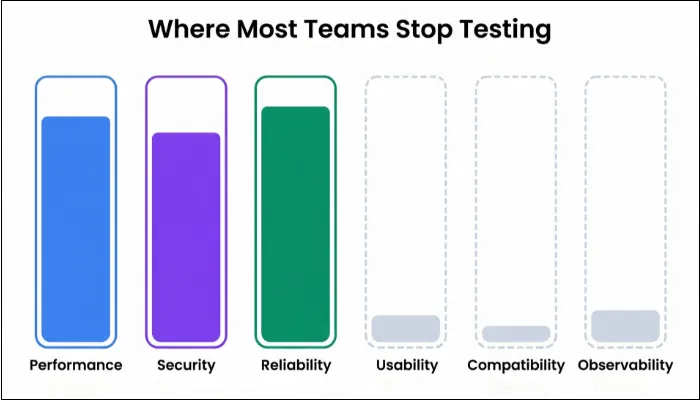
As non-functional testing focuses more on software quality than functionality, the testing types and requirements differ from those of functional testing. This section explains all about different NFT types and requirements.
Performance testing is where you find out whether your enterprise platform behaves as a traffic jam waiting to happen. Here, you’re not just measuring speed but validating how the entire program behaves when real business pressure shows up.
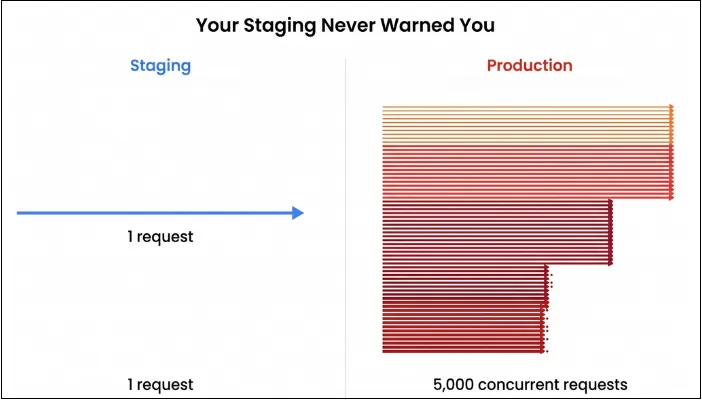
In addition, performance testing checks how fast, stable, and scalable your system is under realistic and extreme workloads. With performance testing, you’re going to answer questions such as:
Example:
Consider an enterprise workflow such as order-to-cash in a retail distribution system.
A single transaction may involve:
Under peak load, thousands of such workflows execute simultaneously. Even a single latency spike or unoptimized step can slow down the entire chain, impacting business operations and transaction throughput.
| Type | Primary question | Typical enterprise example |
| Load testing | Can we handle the expected peak traffic? | Payroll runs for 20000 employees with concurrent self-service access. |
| Stress testing | Where does it break, and how? | Doubling peak order volume during a promotion. |
| Spike testing | Can we survive sudden bursts? | 10x HR portal logins after bonus letters go live. |
| Endurance/soak testing | Does it degrade over long durations? | 48h continuous planning + MRP overnight runs. |
| Volume testing | What happens when data size explodes? | Reporting on 7 years of ledger data and archived HR records. |
| Scalability testing | How do performance and cost change as we add capacity? | Adding more app pods / VMs to support a new region or business unit. |
Even though there are multiple performance testing types, you won’t always need every type for every release. However, if you only ever run one peak load test, you’re flying blind. The best approach is to use the right type as per the demand for the best outcome.
For enterprise software, performance tests fail more often because of bad prerequisites than bad scripts. With that in mind, understanding the requirements helps in extracting the right results from tests.
| ID | Scenario | Inputs & Load Profile | Expected Outcome |
| PT-01 | HR login surge at 10:00 AM. | 8,000 concurrent logins within 5 minutes. | P95 login ≤ 2s, CPU ≤ 70%, auth service error rate < 1%. |
| PT-02 | Month-end financial close. | 500 finance users posting batches and overnight jobs. | No job overrun > 10%, DB locks within acceptable bounds without deadlocks. |
| PT-03 | Stress: double peak order volume. | 2x regular sales orders for 90 minutes. | Degradation is graceful with clear saturation point identification and without data corruption. |
| PT-04 | 24-hour soak for manufacturing planning. | Continuous workload of planners + batch schedules. | No memory leaks, GC thrashing, and increasing error trend. |
Reliability testing involves asking a simple yet significant question: Can your system stay alive when the environment refuses to cooperate? Availability testing, following up with a bit harsher question: can your users depend on your platform every time they need it, without relying on luck?
Then comes resilience testing, which completes the triad by challenging the system to prove whether it bends or breaks when failures appear without prior warning.
These tests determine whether your software behaves like a dependable program or a fragile collection of services pretending to be a platform.
Example:
During a high-load financial posting cycle, a primary database node may fail mid-transaction.
In such scenarios:
If recovery processes are not validated, even short disruptions can lead to data inconsistencies and operational delays across business functions.
| Test Type | Purpose | Enterprise Example |
| Failover Testing | Validate continuity when critical components fail. | Primary DB node crashes during order posting. |
| Recovery Testing | Ensure the system returns to a stable state after disruption. | Batch scheduler restarts mid-payroll cycle. |
| Chaos Testing | Introduce controlled failures to observe system response. | Killing app pods while planners run MRP workloads. |
| Fault Injection Testing | Simulate network, latency, or service degradation. | Deliberately slowing the tax engine API during invoice posting. |
| Availability Testing | Measure uptime consistency and SLA adherence. | Ensuring 99.95% uptime during peak retail season. |
| Redundancy Testing | Validate backup resources and data replicas | Switch to the standby cache cluster when the primary misbehaves |
Designing these test cases involves a systematic approach:
| Test Case | Scenario | Expected Behavior |
| DB Failover Under Load | Terminate primary DB node during financial posting with 300 concurrent users. | Failover should complete within the target window, and the application should reconnect without user intervention or missing ledger entries. |
| Service Pod Termination | Kill multiple service pods while 5,000 users create orders. | Remaining pods should handle traffic without collapsing. Autoscaling should restore capacity smoothly. |
| Integration Latency Injection | Inject 300ms latency into the external tax engine during invoice creation. | The system should delay gracefully without invoice corruption. |
| Batch Engine Restart | Restart payroll scheduler mid-cycle. | The job should resume from the last safe point, and the final output should reconcile with the expected totals. |
An enterprise software shouldn’t be just high-performing or full of functionalities; it should be secure and meet the necessary compliances as well. Security and compliance testing ensure that your app doesn’t just claim to be secure, but provides documented evidence that withstands auditors, regulators, and real attackers.
Security testing includes taking all the necessary measures to prevent any malicious activity from happening, whereas compliance testing proves alignment with GDPR data minimization, PCI-DSS tokenization, SOX financial controls, HIPAA health data protections, or any other industry-relevant compliance.
These tests protect the software from attackers, legal penalties, and breaches, and provide assurance to the users that their data is in good hands.
Example:
In enterprise systems handling payroll or financial transactions, a security gap can expose sensitive data such as employee salaries or vendor payment details.
If access controls fail or APIs are not properly secured:
Security testing ensures these risks are identified and mitigated before production.
| Test Type | Purpose | Enterprise Example |
| Vulnerability Scanning | Identify known security vulnerabilities automatically. | Scanning the ERP web app for outdated components or OWASP Top 10 risks. |
| Penetration Testing | Simulate real-world attacks to validate resistance. | Engaging ethical hackers to breach payroll or vendor payment modules. |
| Authentication & Authorization Testing | Confirm proper identity and permission enforcement. | Validating RBAC and MFA behavior across HR data access. |
| API & Integration Security Testing | Examine the security of internal and external APIs. | Stress-testing tax engine and bank gateway integrations for abuse patterns. |
| Data Protection & Encryption Testing | Validate data encryption in transit and at rest. | Ensuring sensitive fields like SSNs or salary figures are encrypted and cannot be read in logs. |
| Compliance Validation | Assess alignment with legal and industry standards. | Verifying audit logging, retention policies, and incident response readiness against GDPR or SOX. |
| Test Case | Scenario | Expected Behavior |
| Vulnerability Scan Against ERP Frontend | Automated tool scans for outdated libraries and OWASP Top 10 exposures. | No critical vulnerabilities with low-risk findings scheduled for patching. |
| Role-Based Access Control Validation | Finance user attempts to access HR salary data. | Access denied with logged event and audit trail captures attempted violation. |
| Penetration Test of Vendor Payment Workflow | An ethical hacker attempts to chain multiple injections and logic flaws. | All attacks are blocked without exposing any sensitive data. The incident should be reported with traceable logs. |
| Encryption Validation of Sensitive Fields | The system processes employee IDs and tax info. | Data remains encrypted in transit and at rest. Logs never contain raw sensitive values. |
| Compliance Audit Simulation | Simulated GDPR request for data export and erasure. | Data export contains only permitted fields and logs deletion events per retention policies. |
Usability testing doesn’t focus on aesthetics but more on whether users can complete their daily work without feeling confused or frustrated by the enterprise software. In any case, if usability falls short, productivity will eventually collapse before performance or security issues appear.
Accessibility testing extends that mission by ensuring that your enterprise software doesn’t exclude users who rely on assistive tools or alternative input methods.
Example:
Consider a manager approving dozens of purchase orders during peak operational hours.
If the workflow:
It directly impacts productivity and decision-making speed across the organization.
| Test Type | Purpose | Enterprise Example |
| Task Efficiency Testing | Measures how easily users complete frequent workflows. | Verifying how many steps are needed to create or approve a purchase order. |
| Navigation Flow Testing | Evaluates logical structure and clarity of paths. | Testing whether managers can find payroll reports without searching endlessly. |
| Accessibility Compliance Testing | Checks WCAG and assistive technology support. | Ensuring screen readers correctly interpret HR forms and tables. |
| Cognitive Load Testing | Assesses mental effort required to use the system. | Auditing complex financial posting screens for overwhelming design. |
| Error Handling and Feedback Testing | Examines clarity of messages and recovery options. | Confirming the invoice-upload errors guides users to fix incorrect fields. |
| Keyboard and Shortcut Testing | Validates efficiency for expert users. | Ensuring planners can navigate MRP screens without relying on a mouse. |
The following are the things you need to keep in mind while performing this non-functional testing type on your enterprise software:
| Test Case | Scenario | Expected Behavior |
| Purchase Order Approval Flow Audit | The manager approves 50 purchase orders during peak hours. | Approval requires minimal navigation. |
| Keyboard-Only Navigation Test | Planner navigates the MRP workbench using only keyboard shortcuts. | Focus order is logical, where shortcuts work consistently, and no UI element becomes inaccessible without a mouse. |
| Screen Reader Evaluation for HR Forms | HR staff completes employee profile updates using a screen reader. | Labels are correctly announced where grouping and hierarchy make sense. |
| Error Feedback Review on Invoice Upload | The user uploads a bulk invoice file with multiple incorrect fields. | Error messages point directly to problematic rows, corrective guidance is specific, and the user can reattempt the upload without restarting the workflow. |
Organizations use a plethora of devices, including varying screen sizes, operating systems, hardware options, and device types. Your enterprise software should behave consistently everywhere it’s expected to run.
Undeniably, it’s one thing to build a platform for a controlled environment, but it's another to deploy it across a company where every team has unique hardware, browser versions, operating systems, and network setups.
Furthermore, the challenge is bigger in global enterprises where you don’t have control over the ecosystem. The best thing you can do is to adapt accordingly.
With compatibility non-functional testing, you can test whether your software works consistently across various requirements. Your enterprise software should be tested across various permutations and combinations of devices, operating systems, screen sizes, and more to ensure it functions seamlessly on all devices.
Example:
In large organizations, users access enterprise systems across different environments:
If compatibility issues occur, critical workflows such as payroll processing or order management may fail for specific user segments without visibility to engineering teams.
| Test Type | Purpose | Enterprise Example |
| Browser Compatibility Testing | Ensures UI behaves consistently across browsers. | Testing Chrome, Edge, Firefox, and Safari during payroll approval workflows. |
| OS Compatibility Testing | Validates system behavior on different operating systems. | Running ERP dashboards on Windows, macOS, and Linux environments. |
| Device Compatibility Testing | Checks usability and performance across device types. | Verifying HR self-service on mobile, tablet, and desktop. |
| Network Compatibility Testing | Examines behavior under varied network conditions. | Testing ERP access over VPN, low bandwidth, or high-latency corporate networks. |
| Regional & Localization Compatibility | Confirms system adapts to time zones, currency, and formats. | Ensuring date formats and number formatting behave correctly across regions. |
| Configuration Compatibility Testing | Checks diverse enterprise setups and security policies. | Verifying software response under different group policies, VPN rules, and SSO configurations. |
| Backward Compatibility Testing | Check version changes. | Verifying that any new version update functions correctly on legacy devices. |
| Test Case | Scenario | Expected Behavior |
| Cross-Browser Payroll Entry Test | Perform payroll adjustments on Chrome, Edge, Firefox, and Safari. | The layout remains intact, and no browser-specific script errors. |
| Mobile vs. Desktop HR Self-Service Flow | Submit leave requests via mobile app and desktop browser. | Forms render correctly, file attachments work on both devices, and the session remains stable. |
| VPN Network Compatibility Check | Access ERP over corporate VPN with variable latency. | Pages load without timeout. |
| Regional Formatting Verification | Test order creation in EU and US locale settings. | Currency, decimal formats, and date fields follow region-specific rules without breaking validation. |
Observability testing evaluates whether your metrics, logs, traces, dashboards, alerts, and operational workflows showcase the true picture. Without it, outages become mystery hunts costing thousands per hour while engineers stare at dashboards showing everything green.
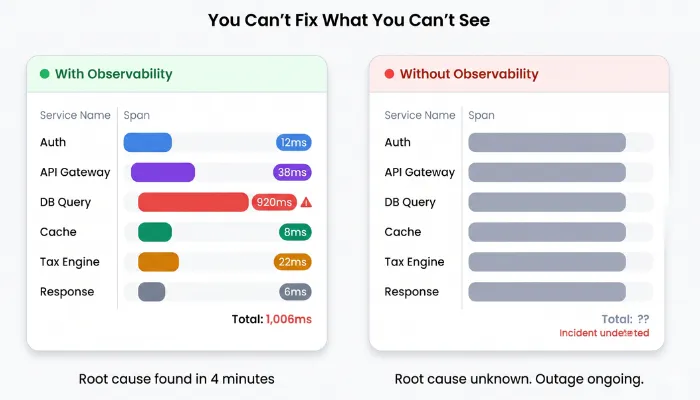
Teams with mature observability cut mean time to resolution by 50-70%, turning panic into precision.
Example
During a payroll cycle, if a database replica fails and an external banking API introduces latency, the system must provide clear visibility into:
Without proper observability, teams spend hours diagnosing issues that should be resolved in minutes.
| Test Type | Purpose | Enterprise Example |
| Metrics Verification Testing | Validates the collection of system and business KPIs. | Confirming that ERP posting latency, queue depth, and throughput are accurately recorded. |
| Log Completeness and Structure Testing | Ensures logs contain actionable and contextual data. | Checking HR audit logs for user ID, action, timestamp, and outcome. |
| Distributed Tracing Validation | Confirms end-to-end visibility in multi-service workflows. | Tracing an order from UI to inventory, pricing, tax, shipping, and finance. |
| Alert Accuracy and Threshold Testing | Ensures alerts fire at the right time with meaningful detail. | Triggering DB saturation to verify that alerts reach SREs before users feel the impact. |
| Dashboard Integrity Testing | Checks the correctness and timeliness of observability dashboards. | Validating that financial close dashboards correctly display backlog and bottlenecks. |
| Incident Simulation Testing | Evaluates operational readiness and signal usefulness. | Simulating a failed external tax engine during invoicing. |
| Element | Specification |
| Test ID | OBS-PAYROLL-001 |
| Scenario | Database replica failure during peak payroll + external bank API delay. |
| Injected Failure | Kill the read replica, and inject 5s latency to the bank validation service. |
| Expected Telemetry | Payroll job lag metric > threshold, trace showing bank API timeout cascade, error rate spike. |
| Success Metrics | Alert fires in <90s, and SRE identifies root cause in <8 minutes using dashboards |
| Environment | Staging payroll system with a full observability stack (metrics/logs/traces). |
| Pass Criteria | Complete incident resolution path documented, and runbook created. |
| Validation | Replay telemetry in ops training, confirm < 5-minute resolution. |
If any of these answers are unclear, your system is operating with hidden risk.
Move from Assumptions to Measurable Assurance
Most teams discover non-functional gaps only after production incidents.
By then, the cost is already paid in downtime, lost revenue, and customer trust.
ThinkSys helps enterprise teams:
If you’re scaling your platform or preparing for high-risk releases, now is the time to validate your system under real-world pressure.
At enterprise scale, even small performance or reliability gaps compound into significant business risk.

About the Author
Harsh Goel
Sr. Technical Content Writer at ThinkSys with 10+ years of experience


