Bug Triage Meetings Explained: What They Are, Why They Matter, and How to Conduct Them
Introduction
There is no denying that bugs are inevitable and part of the software development process. The goal of every testing team is to identify any underlying bugs that could impact core functionality and the user experience.
During the initial phases, every software contains a plethora of bugs. It's up to the testing team to determine which bugs to fix and when.
However, when bugs pile up, and insignificant issues are fixed early, it's time to realize that the bug triage process is in dire need of re-evaluation.
Bug triage meetings are where all crucial leads and team members gather to discuss how to move forward with the bug-fixing process. The goal of every such meeting is to prioritize bugs and clear the backlog.
If that makes you feel overwhelmed, don't worry, as this guide will cover all about bug triage meetings, including:
- What they are
- The process
- Who does what
- Best practices
- Tools
- Everything else in between
What is a bug triage meeting?
Bug triage is the process of reviewing reported defects and determining their severity, priority, ownership, and resolution timeline.
You know about bugs, but the word 'triage' is derived from the medical industry, where doctors quickly sort patients by urgency rather than arrival order, ensuring that limited resources go first to life-threatening cases.
Experts recognized the importance of prioritizing bugs by impact and implemented this methodology in software testing. In your backlog, that means a payment-blocking defect on production gets attention before a minor layout issue on an internal admin page, even if the cosmetic bug was logged days earlier.
Key Questions Answered in Bug Triage Meetings
In a bug triage meeting, you collectively answer questions such as:
- Is this defect real and reproducible?
- How badly does it affect users or the system?
- Does it block a release or a key workflow?
- Who should fix it, and by when?
Agile vs Traditional Approach
Whether you follow agile models or a traditional approach to software development, bug triage applies to both, though with slight differences:
- Agile teams: Triage is often continuous, tightly integrated with sprint planning and backlog grooming
- Traditional projects: Triage tends to happen at defined checkpoints, such as test cycles or pre-release phases
Regardless of methodology, the objective remains the same: making informed, shared decisions about defects.
Important Note: Severity vs Priority One of the biggest dilemmas in bug triage meetings is using severity and priority as interchangeable terms. However, that's the wrong approach. Although the differences between the two are minor, using them interchangeably can have significant consequences. A bug can be high-severity but low-priority, or low-severity but high-priority. Effective triage depends on keeping this distinction clear. |
Why Bug Triage Meetings are Crucial
One of the commonest questions regarding this topic is: Why do bug triage meetings even matter?
If you skip structured triage, bugs don't disappear. Rather, they resurface later as missed deadlines or production incidents. Regular triage meetings create discipline around defect handling and bring multiple benefits, including:
Reduced Backlog Sprawl
Security data shows how dangerous unmanaged backlog sprawl really is. In large enterprises, 45.4% of discovered vulnerabilities remain unpatched after 12 months, and 17.4% of those are high- or critical-severity.
Many teams discover that a significant portion of their bug backlog consists of:
- Duplicates
- Outdated issues
- Items that no longer matter to the business
By performing these meetings, you can:
- Close obsolete or non-reproducible bugs with clear reasoning
- Merge duplicates into a single canonical issue
- Defer low-value items in a traceable way instead of letting them rot
Efficient Resource Allocation
With these meetings, you understand which issues need immediate attention and which issues can wait. Using the data, you can allocate resources accordingly, ensuring efficient resource allocation towards fixing necessary bugs.
Data Driven Decisions
Instead of making decisions based on gut feeling, bug triage meetings allow data-driven decision-making. Using the correct data helps in prioritizing essential bugs.
Better Communication and Team Morale
When triage is done in a cross-functional forum, it becomes a shared conversation instead of a blame game. The openness it offers reduces friction and expectations.
Who Should Attend Bug Triage Meetings?
Any meeting is as good as the people attending it. A successful triage meeting requires a diverse range of perspectives to balance technical feasibility with business necessity.
With that in mind, you need to identify who the right fit is to attend the meeting and their responsibilities. Most effective triage meetings include representatives rather than the entire teams, and these representatives include:
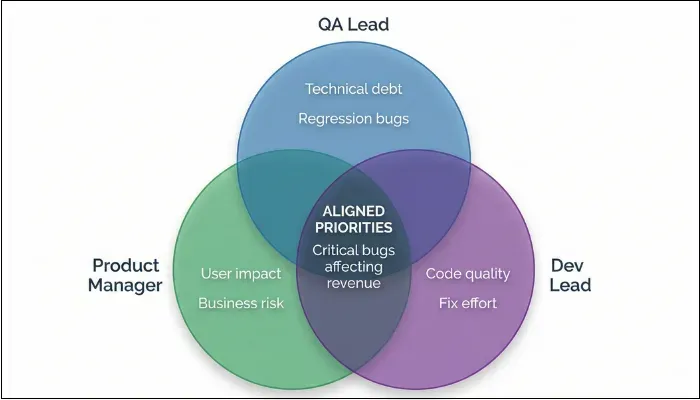
QA Lead
The QA lead owns the triage process and ensures that defect discussions are grounded in verified data rather than assumptions or incomplete reports.
Responsibilities:
- Pre-screening incoming bugs for validity, duplicates, and completeness
- Ensuring each defect includes clear reproduction steps, environment details, and evidence
- Classifying initial severity based on system impact and risk
- Identifying defect patterns, regressions, and high-risk areas
- Providing an objective assessment of technical severity and quality risk
- Preventing low-quality or non-actionable bugs from consuming triage time
- Flagging defects that may increase long-term maintenance or regression risk
Product Manager
The Product Manager ensures that the triage process aligns with the broader project timelines and milestones by facilitating meeting scheduling, recording decisions, and distributing meeting minutes.
Key tasks:
- Evaluates how defects affect customer experience, key user journeys, and adoption or conversion metrics
- Assesses business impact related to revenue, SLAs, compliance obligations, or brand perception
- Determines urgency by aligning defects with release timelines, roadmap commitments, and market expectations
- Makes trade-off decisions when multiple defects compete for limited engineering capacity
- Ensures prioritization reflects business value rather than purely technical severity
Development Lead
The development lead grounds triage decisions in technical reality. This role ensures that prioritization reflects actual effort, risk, and system complexity.
Key Responsibilities:
- Reviews defects to assess how difficult they are to fix beneath the surface
- Identifies dependencies across services, modules, or third-party integrations
- Flags defects that require architectural changes, data migrations, or high-risk refactoring
- Explains potential side effects and regression risks associated with fixes
- Pushes back on unrealistic timelines when fixes are more complex than they appear
- Suggests safer alternatives such as workarounds, feature toggles, or phased fixes
- Helps sequence bug fixes to minimize instability and technical debt
Project Manager
You want someone who keeps the meeting grounded in time and outcomes; then the project manager is the one. By focusing on structure and clarity, they ensure that triage decisions turn into actual outcomes.
Key responsibilities:
- Facilitates the meeting to keep discussions focused and time-bound
- Prevents triage from turning into root-cause analysis or design debates
- Ensures every bug exits the meeting with a clear decision: fix now, defer, reject, or investigate
- Tracks unresolved or deferred bugs to prevent them from being endlessly recycled
Testers and Other Stakeholders
Although involving testers and other stakeholders in bug triage meetings is not mandatory, doing so may provide a unique perspective on whether a defect is truly understood.
They can:
- Explain how the defect was discovered and under what conditions
- Clarify environment-specific behavior, data dependencies, or configuration issues
- Distinguish between consistently reproducible defects and intermittent failures
- Compliance or security stakeholders flag regulatory, audit, or legal implications
- Stakeholders quantify real-world impact that may not be visible in test environments
How Frequently to Hold Bug Triage Meetings?
Having bug triage meetings once in SDLC is neither effective nor recommended. The frequency of bug triage meetings is not a one-size-fits-all metric.
To determine the appropriate triage meeting frequency, consider several factors, including:
- Project size
- Release cycles
- Defect volume
- Production exposure
Key Factors
- Project Size and Complexity: Large-scale B2C apps with millions of daily users often require daily triage to keep pace with the influx of telemetry-driven bug reports. However, smaller projects may only need a weekly check-in.
- Release Cycle Phase: As the release date approaches, it's best to increase the frequency of meetings. In the code freeze phase, daily high-stakes triage is standard to ensure only blockers remain.
- Defect Volume: If the backlog exceeds a manageable threshold, daily triage may be necessary until the queue is reduced to a stable level.
- Production Exposure: Consumer-facing apps or mission-critical enterprise systems warrant tighter triage because the cost of delay is high.
Recommended Frequencies
- Daily Triage: Conducting daily triage meetings is recommended for major B2C apps or during critical launch windows to catch post-deployment defects promptly.
- Standard Weekly Cadence: Ideal for most Agile teams during steady-state development. A 45-minute weekly session allows for priority reassessment and capacity allocation for the next sprint.
- Ad-hoc Emergency Triage: Triggered by the discovery of a Blocker or security vulnerability that cannot wait for the scheduled session.
Additional recommendations:
|
Preparing for Bug Triage Meetings
The foundation of every establishment should be strong to ensure its stability. The same applies to bug triage meetings, and its foundation is pre-screening and appropriate preparation.
When you invest in pre-screening, you spend your meeting time making decisions rather than deciphering cryptic tickets. Your goal is to conduct rigorous pre-screening to ensure the meeting remains focused on decision-making rather than investigation.
Pre-Meeting Checklist
- Collect and Filter: Make sure to include all new, reopened, and for-review defects from your tracking system since the last triage.
- Remove Duplicates: Duplicate defects waste time and resources during the meeting. It's best that you remove duplicates by using search, tags, and AI or heuristic-based suggestions in tools or bug tracking systems such as Jira or Bugzilla to merge duplicate reports into a single canonical issue.
- Verify Reproducibility: Each bug should be reproducible for proper fixing. You have to attempt to reproduce the bug in the relevant environment and note the exact build, configuration, and conditions.
- Create a High-Quality Bug Report: One of the most critical aspects of preparing for the bug triage process is having high-quality bug reports. Each bug should have:
- Clear title and summary (what, where, when)
- Detailed steps to reproduce
- Expected vs. actual behavior
- Screenshots, logs, or session replays where helpful
- Environment details (version, device/OS/browser, and data set)
- Initial severity suggestion: Add a preliminary severity based on functional impact to guide the discussion. Though changes can occur after the meeting, giving a severity suggestion gives an initial idea and a starting point.
- Group by Theme: Cluster bugs by module or platform to streamline discussion and avoid context-switching.
Step-by-Step Bug Triage Meeting Process
Once you're done with the preparation, it's time to move on to the actual bug triage meeting. The following are the details of bug triage meetings steps, allowing you to get a clearer picture of the process:
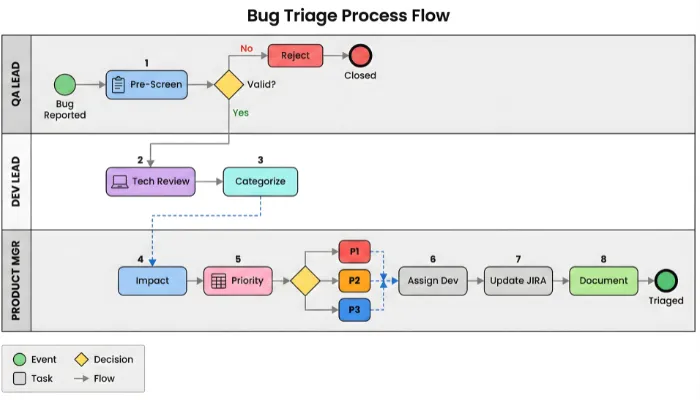
- Step 1: Review Bug Reports: The first step in the bug triage procedure is to utilize the bug reports created earlier. The QA Lead presents newly reported bugs since the last session. The focus is on understanding the symptoms and the technical impact of the bugs. The goal is to validate the bug reports for clarity and reproducibility.
- Step 2: Categorize Bugs: After reviewing the bug reports, the next step is to categorize them by type. By classifying each bug by type using tags, labels, or another method your team deems appropriate, you make it easier to track and organize bugs for future use.
For triage meetings, there are three categories:- Defects to fix now
- Defects to fix later
- Defects that'll never be fixed
- Step 3: Assess its Business and User Impact: The motive is to identify bugs that need immediate attention versus those that can wait. And, the first part of that action is to evaluate the business and user impact of the bug.
Begin with production incidents, critical severity issues, and bugs affecting key business flows.
Key questions to answer:- Does the bug affect the business revenue?
- Does it hamper the goodwill the company has created?
- How many users are affected if the bug is left untreated?
- How frequently does the bug appear?
- Does it compromise the application's security?
Answering these questions will help you assess the bug's impact.
- Step 4: Assign Priority: With severity and business impact understood, the team assigns bug priority. Priority levels typically follow this structure:
- P1: Must be fixed immediately, often blocking release or requiring a hotfix
- P2: High importance, but can be scheduled into the next sprint or release
- P3: Low urgency, can be deferred without significant risk
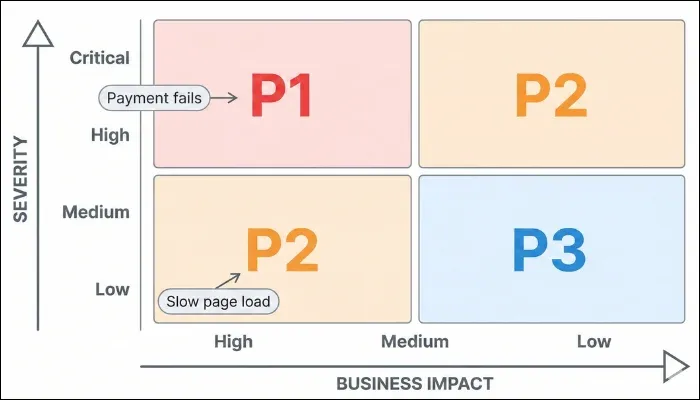
Priority Decision Matrix
The following matrix combines severity with business impact. You can adjust based on your context, but the logic remains the same: move diagonally toward P1 for anything that threatens production stability or key outcomes.
- Step 5: Assign Bugs: After having a clear idea of the priority of bugs that need to be fixed immediately and those that can wait, the next step is to hand them over to the appropriate team members.
However, assigning bugs shouldn't be random but should be based on personnel's expertise. Another significant aspect is to assign bugs as soon as possible to avoid further delays and eliminate confusion among members.
- Step 6: Track Everything: Not every concerned person is involved in the meeting, but the representatives of the necessary teams are. In that case, it's crucial to track every decision made and action taken.
What to document:- Bug statuses, priorities, and owners
- Update them in monitoring tools such as Jira, Bugzilla, or Trello
- Include a summary or meeting note that is shared with relevant stakeholders
Bug triage metrics to track - Mean Time to Resolution (MTTR)
- Mean Time to Triage (MTTT)
- Bug Fix Rate / Resolution Rate
- Bug Recurrence Rate
- Severity vs. Priority Distribution
- Average Bug Backlog Size
- Step 7: Review and Close: The last step in the bug triage meeting process is to review any unresolved bugs. The goal here is not to understand why the bugs remain unresolved even after the necessary actions, but to resolve them as quickly as possible.
You can adjust bug priorities as needed to ensure they are eradicated. If everything goes well and bugs are resolved, it's time to focus on the next triage. Doing so allows you to make the bug triage workflow continuous.
Why Bug Triage Meetings Fail?
Despite having well-defined processes and tools, many organizations still struggle to make bug triage meetings effective. In most cases, the failure comes due to common mistakes and poor execution. Below are the most common reasons bug triage meetings break down:
- Too Many People: A common anti-pattern in turning bug triage into a large group discussion with representatives from every possible team, but no one with final decision-making authority. When everyone has a voice, but no one owns the outcome, prioritization takes a hit.
- Triage Turning into Root-Cause Analysis: Bug triage meetings are designed for classification and prioritization, not deep technical investigation. However, many sessions drift into architecture discussions or design debates. Doing so consumes crucial meeting time and distracts from the primary goal of deciding what happens next to each defect.
- Decisions Not Reflected in Tracking Tools: One of the most damaging failures occurs after the meeting ends. Bugs are discussed, and decisions are verbally agreed upon, but trackers are not updated immediately.
As a result:- The same bugs resurface in future triage sessions.
- Teams work against outdated priorities.
- Stakeholders lose trust in the process.
- Treating Triage as a One-Time Event: Some teams run triage only before releases or after production incidents. Taking a reactive approach leads to backlog buildup, rendering all triage efforts futile. Bug triage must be continuous and predictable, with frequency adjusted based on defect volume and release risk.
Best Practices for Effective Bug Triage Meetings
Follow these proven practices to run smooth, productive triage meetings:
- Prepare Thoroughly Before Every Meeting: Pre-screen bugs to filter out duplicates, invalid reports, and incomplete information. This ensures the meeting focuses on decision-making, not investigation.
- Keep the Right People Involved: Include representatives from QA, Development, Product Management, and Project Management—but avoid inviting entire teams. Too many voices slow decisions.
- Keep Meetings Short and Focused: Aim for 30-60 minutes maximum. If meetings run longer, you're either trying to cover too much or getting into technical weeds. Stay disciplined about the agenda.
- Use Standardized Criteria: Create a clear framework for severity and priority. When everyone uses the same definitions, you waste less time debating classifications.
- Encourage Cross-Team Collaboration: Bug triage works best when teams work together. QA understands the symptoms, developers know the technical constraints, and product managers balance business priorities.
- Make Data-Driven Decisions: Base priorities on measurable facts: failure frequency, affected users, revenue exposure, and customer complaints. Avoid gut-feeling decisions.
- Update Bug Tracking Tools Immediately: Decisions made in meetings are worthless if they're not reflected in your tracking system. Update statuses, priorities, and owners in real-time or immediately after the meeting.
Top Bug Triage Meetings Tools
The right tools make triage easier by enforcing consistency and providing visibility. Here are the most popular options:
Tool comparison at glance
| Tool | Best For | Ease of Use | Customization | Pricing |
| Jira | Enterprise teams | ⭐⭐⭐ | ⭐⭐⭐⭐⭐ | $$ |
| Bugzilla | Open-source projects | ⭐⭐⭐⭐ | ⭐⭐⭐⭐ | Free |
| Trello | Small teams | ⭐⭐⭐⭐⭐ | ⭐⭐⭐ | $ |
| Asana | Cross-functional teams | ⭐⭐⭐⭐ | ⭐⭐⭐⭐ | $$ |
1. JIRA
Jira is the most widely used bug tracking tool in enterprise environments. Its strength lies in flexible workflows, custom fields, and powerful dashboards.
Key Features:
- Custom fields for severity, priority, and components
- Dashboards showing bugs by severity, age, and assignee
- Workflow automation for triage states
- Integration with Slack, CI/CD, and error monitoring
2. BUGZILLA
Bugzilla is a reliable open-source bug tracker that's been around for decades. It's simple, stable, and highly customizable.
Key Features:
- Configurable fields for custom severity and priority
- Strong permission controls for team separation
- Plugin support for reports and charts
3. TRELLO
Trello uses a visual Kanban board that makes the triage process approachable, especially for non-technical stakeholders.
Key Features:
- Kanban columns for triage stages (New, To Triage, Assigned)
- Simple card-based interface
- Integration with bug reporting tools
4. ASANA
Asana balances structure and simplicity. It works well for cross-functional teams that need to align bug fixes with project timelines.
Key Features:
- Custom fields for severity and priority
- Timeline views for release planning
- Portfolio reports for multi-product teams
Features You Need to Look Out For
Every tool comes with some common and unique features that make each of them suitable for specific needs. With that in mind, there are several features that you need to look out for while picking the tools:
Automation features:Auto-assigning based on severity or component
- Duplicate detection suggestions
- Natural language support cleanup
- Automated severity and component prediction
- Rule-based field enforcement
- Automatically updating workflows
Some are bug triage automation features, while others utilize artificial intelligence. All these features show promise, especially for teams with high ticket volumes.
However, it's crucial to approach AI with balanced expectations. Sometimes, AI models can misinterpret context or misunderstand business implications. In that case, it's your software quality that will take a toll.
Rather than unquestioningly trusting AI models, the most effective approach is to use AI as augmentation, not automation. You can use AI to reduce noise and speed up sorting, but always apply human oversight for final prioritization and assignment decisions
How AI is Transforming Bug Triage in 2026
The landscape of bug triage is evolving rapidly with artificial intelligence. Here's how AI is making bug triage meetings more efficient:
Intelligent Bug Categorization
AI-powered tools can now automatically categorize bugs based on:
- Error patterns and stack traces
- Affected components and modules
- Historical bug data
- Similar past issues
This reduces manual categorization time and helps teams focus on decision-making rather than classification.
Tools to explore: Linear.app, GitHub Copilot, Jira AI features
Predictive Priority Scoring
Machine learning models analyze bug characteristics to predict:
- Potential user impact
- Likelihood of escalation
- Estimated resolution time
- Risk of production incidents
Smart Duplicate Detection
Advanced NLP (Natural Language Processing) can identify duplicate bug reports even when they're worded differently, saving significant triage time.
Automated Assignment Recommendations
AI can suggest the best team member to fix a bug based on:
- Past bug resolution history
- Code ownership patterns
- Current workload
- Expertise areas
Important Reminder While AI tools are powerful, they should augment, not replace human judgment. Always review AI suggestions before making final triage decisions. |
Free Downloadable Templates
To help you implement effective bug triage meetings immediately, we've created ready-to-use templates:
Available Templates
- Bug Triage Meeting Agenda Template
- Pre-meeting checklist
- Time-boxed agenda structure
- Decision tracking format
- Action items worksheet
- Bug Priority Matrix Spreadsheet
- Automated priority calculator
- Severity vs. business impact grid
- Visual priority indicators
- Customizable for your team
- Bug Triage Report Template
- Meeting minutes format
- Decision log
- Metrics tracking
- Stakeholder summary
- Triage Metrics Dashboard
- MTTR tracking
- MTTT monitoring
- Backlog trend analysis
- Resolution rate charts
How to Get Your Free Templates
Bug Triage Format and Template
Consider a bug triage report as the single source of truth for what was discussed, decided, and assigned during a triage meeting. Without a clear report, triage decisions tend to fade quickly, leading to repeated discussions.
The core characteristics of a bug triage report are consistency and clarity.
While creating the report, you need to have only one goal in mind: complete clarity. Anyone reading it later should immediately understand which bugs were reviewed, how they were prioritized, who owns them, and what happens next.
Below is a simple, practical triage report template and sample that works well across Agile and traditional delivery models:
Bug Triage Report Template
Meeting Information |
| Meeting Date: | _______________ | Facilitator: | _______________ |
| Project/sprint: | _______________ | Attendees: | _______________ |
| ID | Headline | Date Reported | Reported By | Severity | Priority | Owner | Status | Target Release |
| BT-101 | Payment gateway 500 on checkout | 01-02-2026 | QA Lead | Critical | P1 | Dev Team A | Accepted | v2.4.0 |
| BT-105 | UI alignment in Safari (Mobile) | 03-01-2026 | Tester B | Minor | P3 | UI Team | Deferred | v2.5.0 (Backlog) |
| BT-109 | Profile pic upload hangs at 99% | 12-12-2025 | Support | Major | P2 | Dev Team B | Accepted | Sprint 48 |
| BT-112 | Forgot Password link broken | 05-01-2026 | User | Critical | P1 | Dev Team A | Accepted | Hotfix |
You can treat this template as a starting point and customize it based on your project requirements.
Conclusion
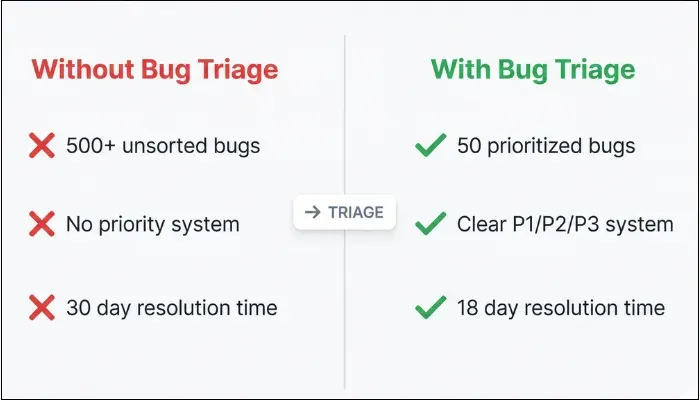
One of the most effective ways you can transform a chaotic backlog into a high-performance engine for software quality is through bug triage meetings. By establishing a predictable structure, you move from reactive to strategic decision-making.
A disciplined triage process can slash your resolution lead times by 40% and significantly boost customer trust.
By implementing the right steps, you align your engineering efforts with your business's most critical goals. Whether you are managing a high-volume B2C application or a complex enterprise system, the structure provided by this guide will help your team ship more stable releases with less stress.
If your existing triage meetings feel rushed or ineffective, the changes outlined in this article offer a practical starting point. Small improvements in the process can significantly enhance how defects are handled across the lifecycle.
However, if you're looking to scale your quality efforts, ThinkSys can help you design a roadmap that fits your specific needs.
Frequently Asked Questions
- Confirm what was tried and capture that in the ticket
- Ask the support for more context, including screenshots, HAR files, session replays, or timestamps
- If the issue can't be reproduced after a defined effort, move it to a "cannot reproduce" or "parked" state with a note
- If a similar bug resurfaces later with better evidence, you can link it and re-open or create a new, better-documented defect
- Implement automated deduplication
- Refine your severity-priority matrices
- Ensure your bug trackers are configured to provide real-time visibility into your release risk
Share This Article:
 Previous Post